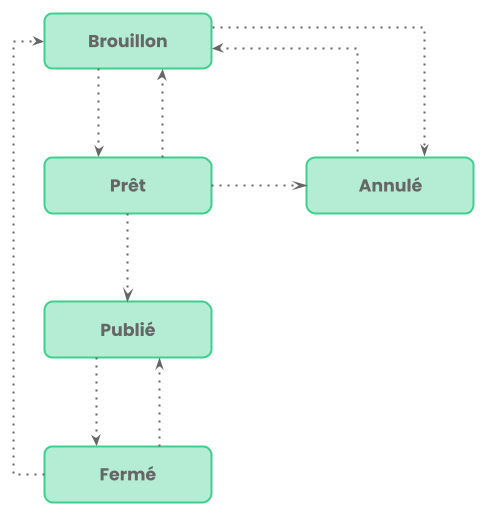
Survey lifecycle
A survey follows a lifecycle marked by five statuses. This cycle makes it possible to separate the design phase from the distribution phase, and to frame the closing or cancellation of a survey.
Draft
When a survey is created, it is in draft. In this state, it is being designed and is not visible to anyone other than administrators. It is at this stage that questions are created in the Designer and the configuration is finalized.
Ready
When the survey is ready to be distributed, the administrator clicks on Ready. This status indicates that the survey is validated and awaiting publication. It is useful in organizations where several people are involved in the validation chain before distribution. From this status, it is always possible to go back to the Draft state if changes are needed, or to cancel the survey.
Published
Publication is the decisive moment:
- the survey becomes accessible to the targeted respondents;
- a publication date is recorded automatically;
- the response records are created where necessary;
- the notification emails are sent.
Once published, the survey can no longer be modified.
Closed
When you want to stop collecting responses, the survey moves to Closed. Responses already collected remain available for consultation, but no new response can be submitted. It is possible to publish a closed survey again if collection must resume.
Cancelled
The Cancelled status corresponds to surveys abandoned before publication. A cancelled survey can always be reset to the Draft state if you wish to resume it.