Distribute a survey
Internal distribution
When an internal survey is published, the targeted users see it appear automatically in their My forms menu. This menu only displays the surveys for which the connected user is in the targets list (directly or via a role), and whose status is Published or Closed. A user who is not targeted will never see the survey in this list, even if they know it exists.
If an email template has been configured, a notification email is also sent to each targeted user at the time of publication. This email allows employees to access the survey directly without having to find it in the menu.
External distribution
For external surveys, the main access channel is the Goovee portal. This portal, separate from AOS, is the web interface aimed at partners and customers. It natively integrates the Survey module and displays two sections to a connected Partner: the list of surveys available to them, and the history of their past responses.
The list of available surveys is built dynamically according to the visibility rules configured on each survey:
- a non-connected visitor only sees public surveys, that is, those for which the Login not required option is enabled and which are not marked as Private;
- a connected partner additionally sees the surveys accessible to them according to the access control rules: open to all connected third parties, or restricted to certain third parties or third-party categories via the Private option;
- in all cases, surveys marked as Hidden never appear in the list.
A search engine also lets the third party find a survey by its name.
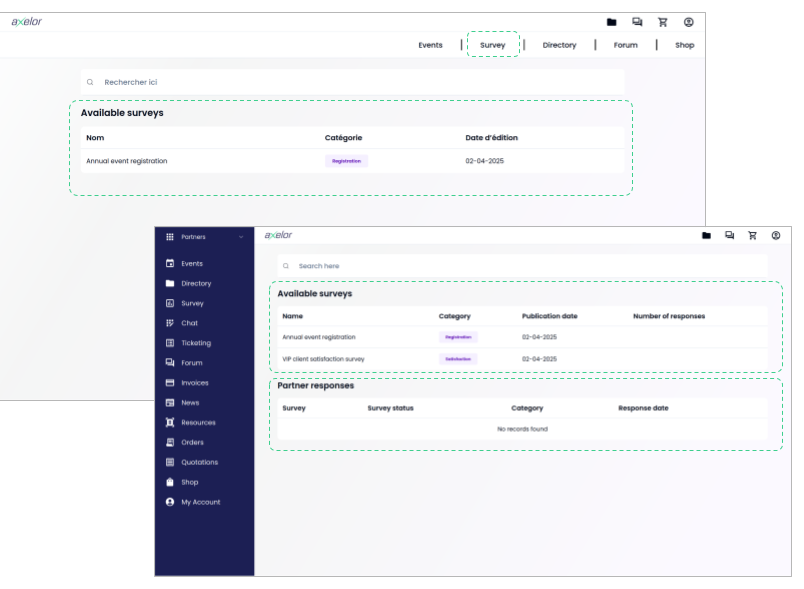
By clicking on a survey in the list, the user directly accesses the entry form, embedded in the portal. Once a response is submitted, it appears in the My responses section of the portal, allowing the user to find and re-read their past entries.
The notification email sent at publication plays an invitation role: it alerts the targeted third parties that a new survey is available and can contain a direct link to it on the portal. But the email is not the only entry point: a third party can perfectly well discover and fill in a survey by browsing the portal directly, without having received a notification.