Management of leave requests
The management of leave reasons has been shifted directly onto the reason itself and no longer on batch processing. A scheduler creation assistant has also been added in the configuration of the leave management app.
Three leave reasons have been added, with the capability to automatically increment leave counters:
-
Leave managed every month: a leave counter line will be created every month.
-
Leave managed every year: a leave counter line will be created every year.
-
Exceptional leave: no leave counter will be managed for this reason of leave.
Additionally, it is possible to:
-
Prorate based on the hire date;
-
Annually reset with the possibility to transfer remaining leaves to another reason type (example: leave N → N-1).
For your information, the old batch still exists and can continue to be used, particularly for mass corrections of leaves when needed.
Configuration of Leave reasons
Access: HR → Leave Requests → Configuration → Leave reason
Once the “Leave reason” menu is opened, you can create a leave reason. On the form of leave reason, the following fields are available:
-
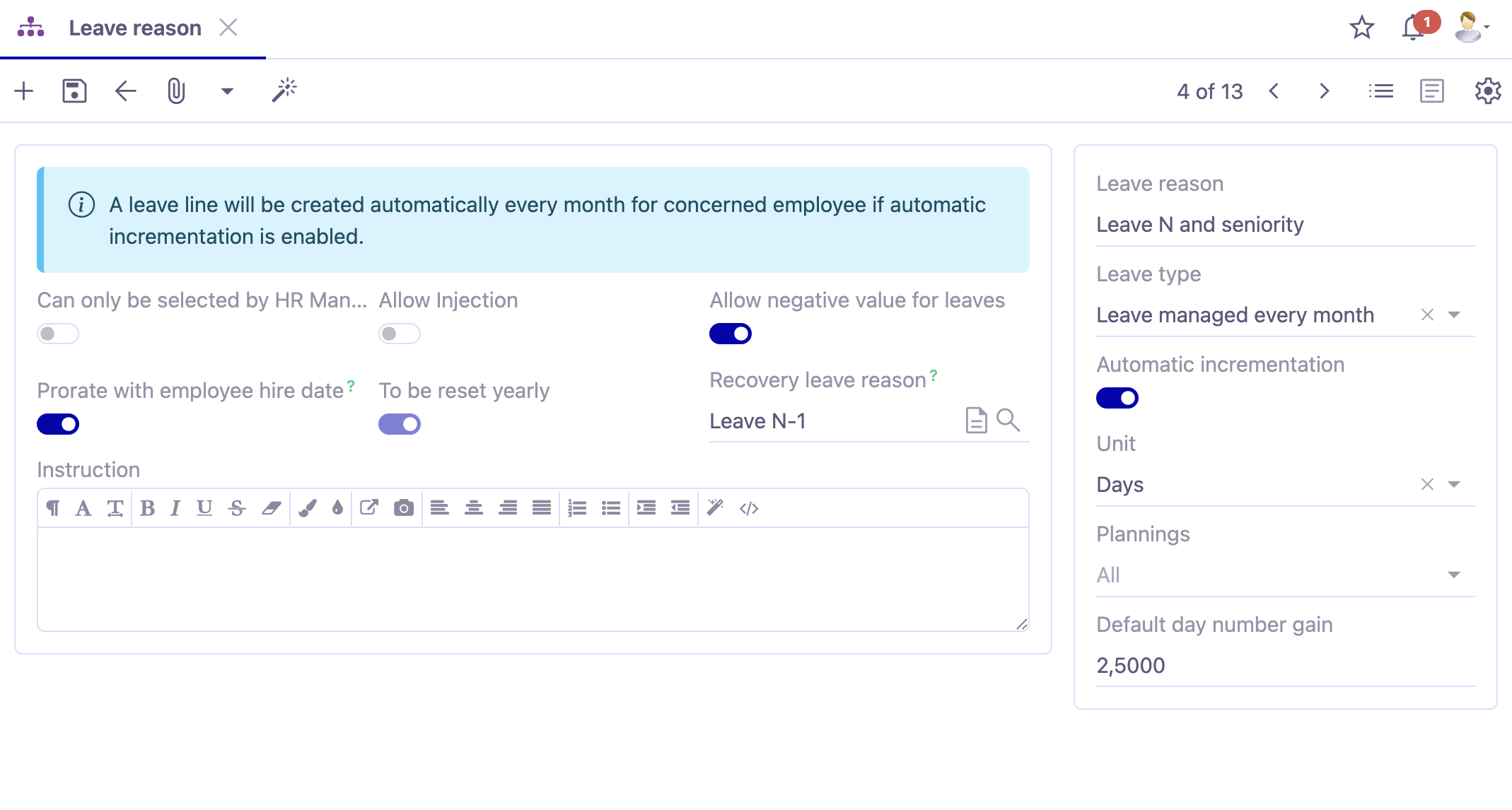
Leave reason: define the reason for the leave in this field. For example, "Legal paid leave and seniority".
-
Allow negative value for leaves: when this option is active, it becomes possible to take a leave even if the leave counter is at 0 or has a negative value.
If you allow negative values for leaves, it’s necessary to activate the configuration in the application.
Access: Application Config → Apps management → Leave Management, Configure → activate the option "Allow negative values for employee leaves".
-
Allow Injection: this checkbox allows for making a request to inject additional days for a leave reason.
-
Default day number gain: this number is retrieved as a default value for the HR batch (Leave Management).
-
Instruction: this field helps the employee to better understand the purpose of the leave reason when selecting a reason.
-
Unit: define the unit of leave (days/hours).
-
Can only be selected by HR Management: in a leave request, this reason for leave will be selectable only by HR. For example, in cases of sickness leave.
-
Export for payroll preparation: if the absence type needs to be considered in payroll elements, this box must be checked. When checked, an export code will appear.
If the checkbox “Export for payroll preparation” is not available on the Leave reason file, then it means that it was not activated previously in the app configuration.
Access: Application Config → Apps management → Leave Management, Configure → activate the option “Enable payroll preparation export”.
Counteurs are not available on version 8.0 or higher. Nevertheless, this functionality implies the use of counteurs “behind the scenes”, since the user should select if the leave is managed monthly or annually (Leave type field).
Leave list on an employee form
- Leave list: it’s a tab where you will find a leave list that contains leaves of an employee.
In this tab, track leave requests for each employee based on existing requests. In the "Leave list" table, you can add different types of absences.
For example, in this table, you could have "Leave to justify", "Legal Paid Leave and Seniority", etc.
In this table, you will have three columns: Acquired / Remaining / Waiting for validation.
-
Acquired: the quantity of acquired days. This number of days can be increased either manually or automatically with a batch.
-
Remaining: the quantity of remaining days.
-
Waiting for validation: the days submitted by the employee waiting for its validation.
- Allow negative value for leaves: check this box if you allow the employee to take leaves when his leave counter is at 0 or negative. As mentioned earlier, it is necessary to activate this option at the application configuration level. Once activated, you can check the "Allow negative values" box on the employee's form under the Leave Accounts tab.
Access: Application config → Apps Management → Leave Management, configure → activate the option "Allow Negative Values for Employee Leaves".
Leave Configuration on a Company file
Access: Application config → Apps Management → Employees management → open the company file → open the tab “Leaves”
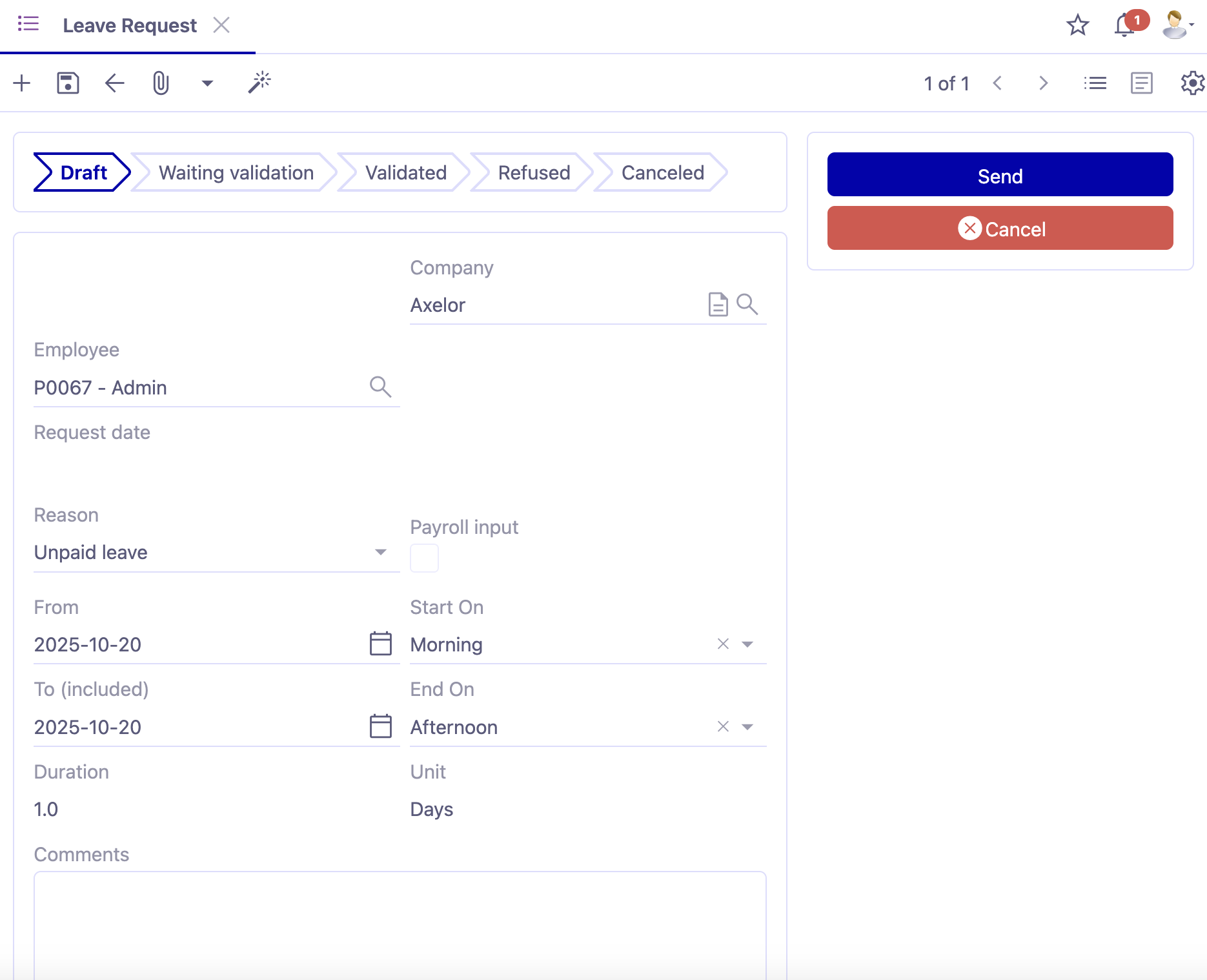
Leave Requests Notification Email: activate the notifications via email for leave requests.
For example, the employee's HR manager will receive an email for a leave request. If it is validated, the employee will receive a validation of the leave. Otherwise, they will receive a rejection/cancellation email.
You can add leave templates in the corresponding fields (template for sent leave request / template for validated leave request / template for denied leave request / template for cancelled leave request).
Leave reason for leave to justify: select in this field the reasons for absences that need to be justified.
Leave Batch rules: in this table, configure the rules of leave batches, linked to the contract type. Use a Groovy formula for the calculations of leaves.
Making a Leave Request
For Employees: MyRH → Leave Request
For HR Manager: HR → Leave Requests → Leave Requests to Validate
The leave request form is identical for the MyRH and HR applications.
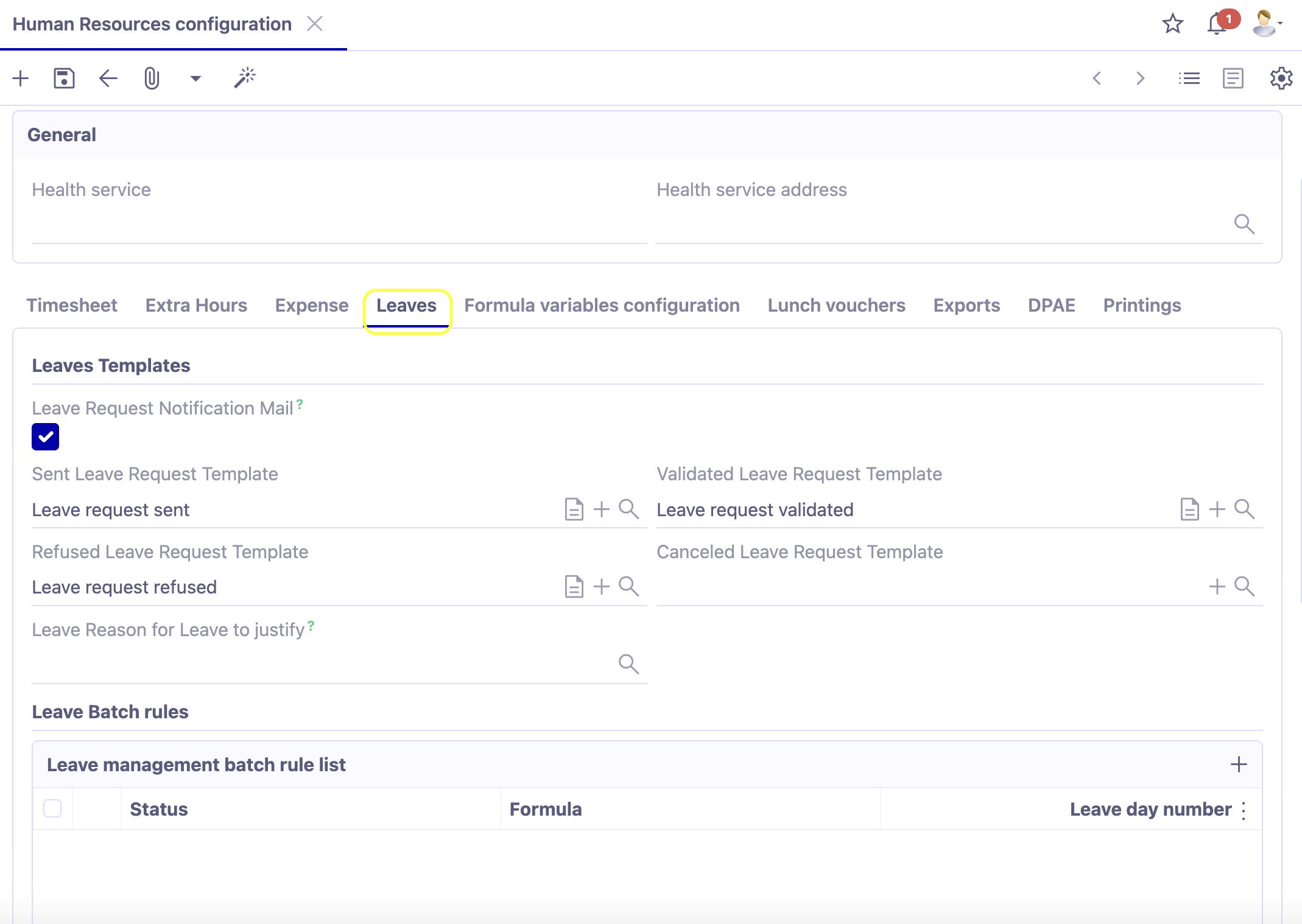
By default, the active employee and company are automatically filled in. On the leave request form, you will find the buttons “Send” and “Cancel”.
- Reason: enter the reason for the leave request.
For admin-type users, it may be possible to select ALL types of absences.
-
Available Quantity: as soon as you select a reason, the available quantity will be displayed. For example, on the employee's record, in the Leave Counters tab, the employee has taken 10 days and has 3 days remaining. Therefore, the quantity of 3 days will be displayed as the available quantity.
-
Inject/Consume: by default, you will find yourself with a request type of "Consume" (i.e., the available quantity will be consumed).
-
From / To: select the dates.
-
Starts on: define when the leave request starts (in the morning or afternoon).
-
Ends on: define when the leave request ends (in the morning or afternoon).
-
Duration: based on the provided information, a calculation of the duration will be automatically performed. For example, the duration may be equal to 2 days.
-
Send: the "Send" button sends the request to the hierarchical manager listed in the employee's record. Subsequently, the leave request will move to the "Waiting Validation" status.
-
Cancel: the "Cancel" button cancels the leave request, and it will automatically move to the "Cancelled" status.
The manager will be able to act on their subordinates' requests from a menu entry "Leave Requests to Validate".
From the "Leave Requests to Validate" menu, open the concerned leave request. You can either validate or deny it.
- Refuse: the "Refuse" button triggers the appearance of a popup allowing you to enter a reason for its rejection.
Upon validation of the reason, it will be recorded on the file, and the request will move to the "Denied" status.
The information related to the user and the date of denial will appear on the leave request file.
- Validate: the "Validate" button allows the status to move from "Waiting Validation" to "Validated". The employee's leave list is thus updated. The information related to the user and the date of validation will appear on the leave request file.
If you have configured notification emails at the application configurations level, on the company file in the Leave tab, a notification email will subsequently be sent.
Leave List Tab: if you open the Leave List tab on the employee's record (after refreshing it), you will notice that the days of leave contained in the "Leave List" table have been deducted from the remaining days.
Configuration of Templates
Access: Application config → Apps Management → Employees management → open the company file → open the tab “Leaves”
Email Templates: in the application configuration by company of the employee management, there is the possibility to configure email templates related to actions in the leave request process (Leave Tab).
Leave management batch rule list : this table corresponds to the rules for obtaining seniority leaves. Define rules for obtaining seniority leaves linked to the contract type "Executive" - "Non-executive". The Groovy formula is called in the calculation of these leaves in batches.
HR Batches (Leave Management Tab)
Access: Application config → Batches → HR Batches
The HR batch for leave requests will treat multiple leaves simultaneously. It can also increment a pre-defined number of days for all employees. A batch can be coupled with a scheduler to automate the process.
Example: add 2.5 days of paid leave every month for all full-time employees.
-
Action: select the action "Leave Management". In the Leave Management tab, you have the possibility to fill in several fields.
-
Type: select the type of leave.
-
Number of Days: by default, the number of days will be equal to 2.5 if this is the number of days that was configured at the level of the leave type. Note that you can modify the number of days for a leave type.
-
Plannings: associate one or more plannings.
-
Employee: select directly the employees benefiting from this type of leave.
The batch is combined with a scheduler, and this scheduler will launch the process at the defined time, and as a result, the increment will be realized through the batch. This increment of acquired days will be visible on the employee's record, in the Leave List tab.