Providers & Models
A provider (AiProvider) is a connection to an LLM vendor; each provider exposes one
or more models (AiModel) that the rest of the module references by code (e.g.
openai/gpt-6.1-sol).
Add a provider
Create a provider under , or seed it from a YAML file
in src/main/resources/ai/providers/ — the file name is the provider’s code — with
its models nested. Models are also listed on their own under , and a provider’s form has a Models tab:
name: OpenAI
type: OPENAI
isEnabled: true
models:
  - code: openai/gpt-6.1-sol (1)
    name: gpt-6.1-sol
    modelId: gpt-6.1-sol
    type: CHAT
    supportsTools: true
    useResponsesApi: true
    reasoningEffort: "low"
    backgroundServiceTier: FLEX
    supportsVision: true
    maxInputTokens: 272000
    isDefault: true (2)
  - code: openai/text-embedding-3-small
    name: Text Embedding 3 Small
    modelId: text-embedding-3-small
    type: EMBEDDING
embeddingDimensions: 1536| 1 | the code is how agents and knowledge bases reference the model |
| 2 | mark one enabled chat model as the global default |
API keys are never seeded. Set them per environment on the Providers screen
(the provider’s apiKey/secret) — otherwise chat calls fail with an auth error.
|
Provider fields
| Field | Meaning |
|---|---|
|
Unique identifier and display name. |
|
|
|
Secret credential (stored encrypted). |
|
Override the vendor endpoint — required for |
|
Activation, and whether the provider is hidden as a built-in. |
|
Model sync rules as JSON — see Sync models from the provider. Blank disables syncing. |
|
Ordering among providers in the chat model picker (providers group first, by this field, then by name). |
|
The |
A CUSTOM provider cannot serve chat or embeddings yet — creating a model on one
fails at call time. It exists so an OpenAI-compatible endpoint can be reached by
model sync, which talks to it through the OpenAI adapter.
|
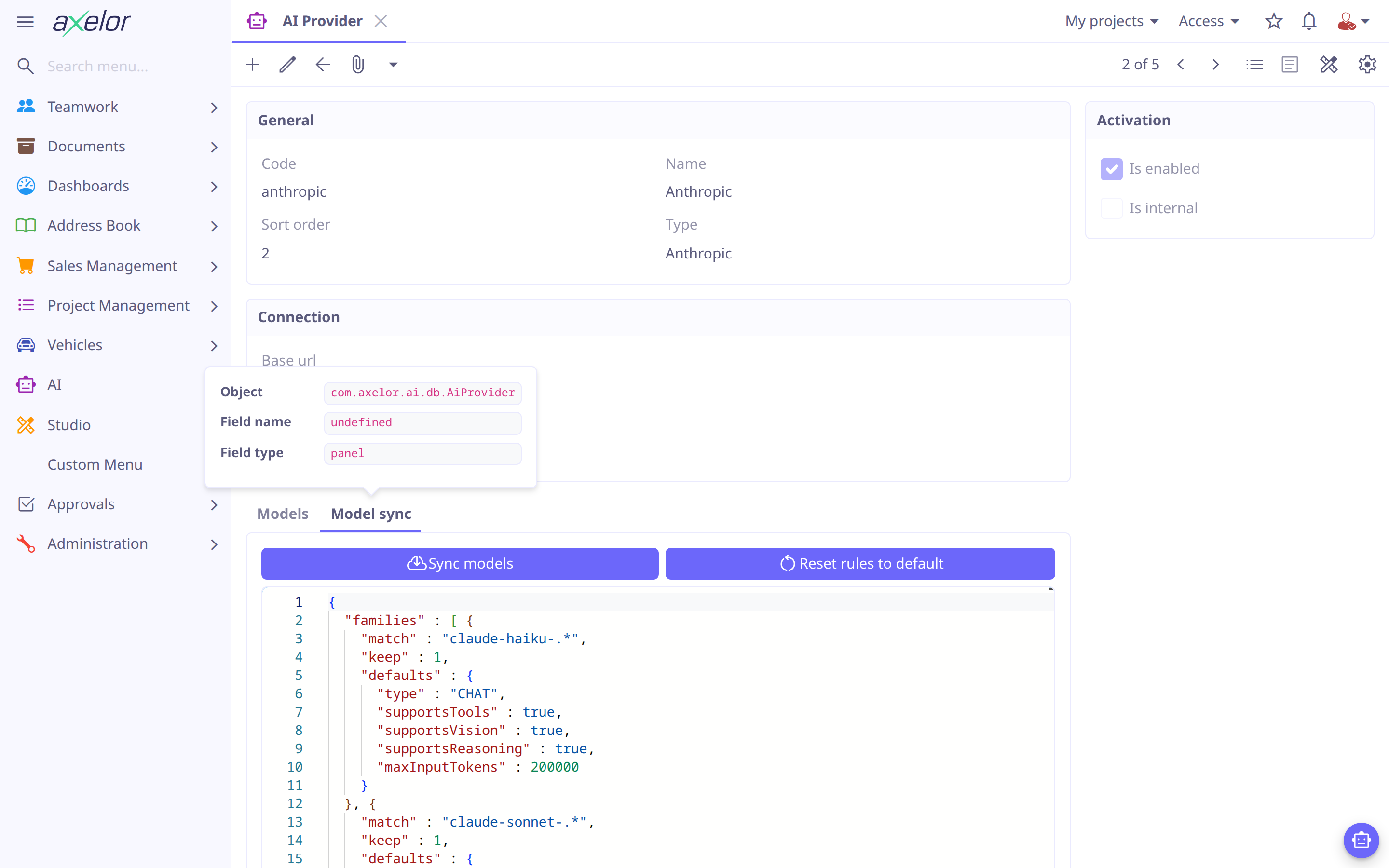
Sync models from the provider
On the provider form’s Model sync tab, Sync models fetches the vendor’s current
model catalogue over its API and applies syncRules to pick the few models worth
having — instead of entering every model by hand. It’s disabled while syncRules is
blank. Reset rules to default restores the shipped rules for that provider’s type.
Supported out of the box: OpenAI, Anthropic, Google, Mistral, and Ollama (which lists
whatever models the server has pulled).
The rules are JSON, written as a sync: block in a seed file:
sync:
  exclude: [".*-preview"]       # ids dropped before any family is consulted
  maxModels: 8                  # hard cap across all families (default 8)
  families:                     # tried in order; the first whose `match` accepts an id owns it
    - match: "claude-sonnet-.*" # a regex the whole model id must match
      keep: 1                   # the newest N it takes; omit to take every match
      defaults:                 # applied only when a model is created
        type: CHAT              # required
        supportsTools: true
        maxInputTokens: 1000000
A family may also carry its own exclude. Sync adds each selected model, named by the
provider’s code and its id, disabled — a model nobody has looked at is not offered in
the chat until you enable it. A model the provider already lists is matched on its
modelId, and only what the vendor itself reports (name, type, capabilities, window,
embedding size) is refreshed on a later sync: the defaults are a guess, so they never
overwrite a value you corrected. A sync never removes or disables a model, and it writes
nothing if it fails.
Editing syncRules directly is the way to follow a family further; the seed file’s
sync: block is applied only when the provider’s rules are blank, so a re-seed does not
flatten an edit.
Model fields
| Field | Meaning |
|---|---|
|
Identifier used everywhere (e.g. by agents) and display name. |
|
The vendor’s model id (e.g. |
|
|
|
Capability flags — a chat agent needs a tool-capable model. |
|
Model parameters and defaults. |
Claude models |
Anthropic needs an output limit on every request: a Claude model with no |
|
The model’s window. Compaction keeps a request inside it, less room for the reply (the output limit, at most a quarter of the window) and never past 200,000 tokens, however large the window: a full million-token window is slow, costly and read less reliably. Without it, the window is taken as 200,000. The shipped OpenAI models use 272000 rather than their 1M window: past 272K input tokens OpenAI bills the whole request at 2× input and 1.5× output. |
|
Vector size, for embedding models. |
|
Requests/second cap for this model. |
|
OpenAI only. Sends chat turns to the Responses API instead of Chat Completions. Chat Completions refuses function tools unless reasoning is |
|
OpenAI only. |
|
Ordering among this provider’s models in the picker. |
|
Activation, whether this is the global default chat model, and built-in visibility. |
| To keep some data off a provider’s models — contact details off a US provider, say — apply a policy to the provider, or to a single model. See Restrictions. |
Default and utility models
Exactly one enabled CHAT model is the global default (isDefault) — used when a
request doesn’t otherwise specify one. Agents may name a cheaper utility model for
background work (titles, summaries, session notes); when unset it falls back to the
agent’s model, then the global default. See Agents.
An agent with tools needs a tool-capable model (supportsTools); on any other
model its turns are refused. Embedding models are only for knowledge bases.
|