Skills
An AiSkill is on-demand expertise. The model always sees a short description; it
loads the full instructions and references only when it calls use_skill — keeping
prompts small while giving deep, focused guidance exactly when needed.
Skills follow the open Agent Skills convention (originally
from Anthropic): a skill is a folder with a SKILL.md (metadata + instructions) plus
optional bundled references, surfaced to the model through progressive disclosure. The
same authoring model is used here, backed by AiSkill/AiSkillReference records.
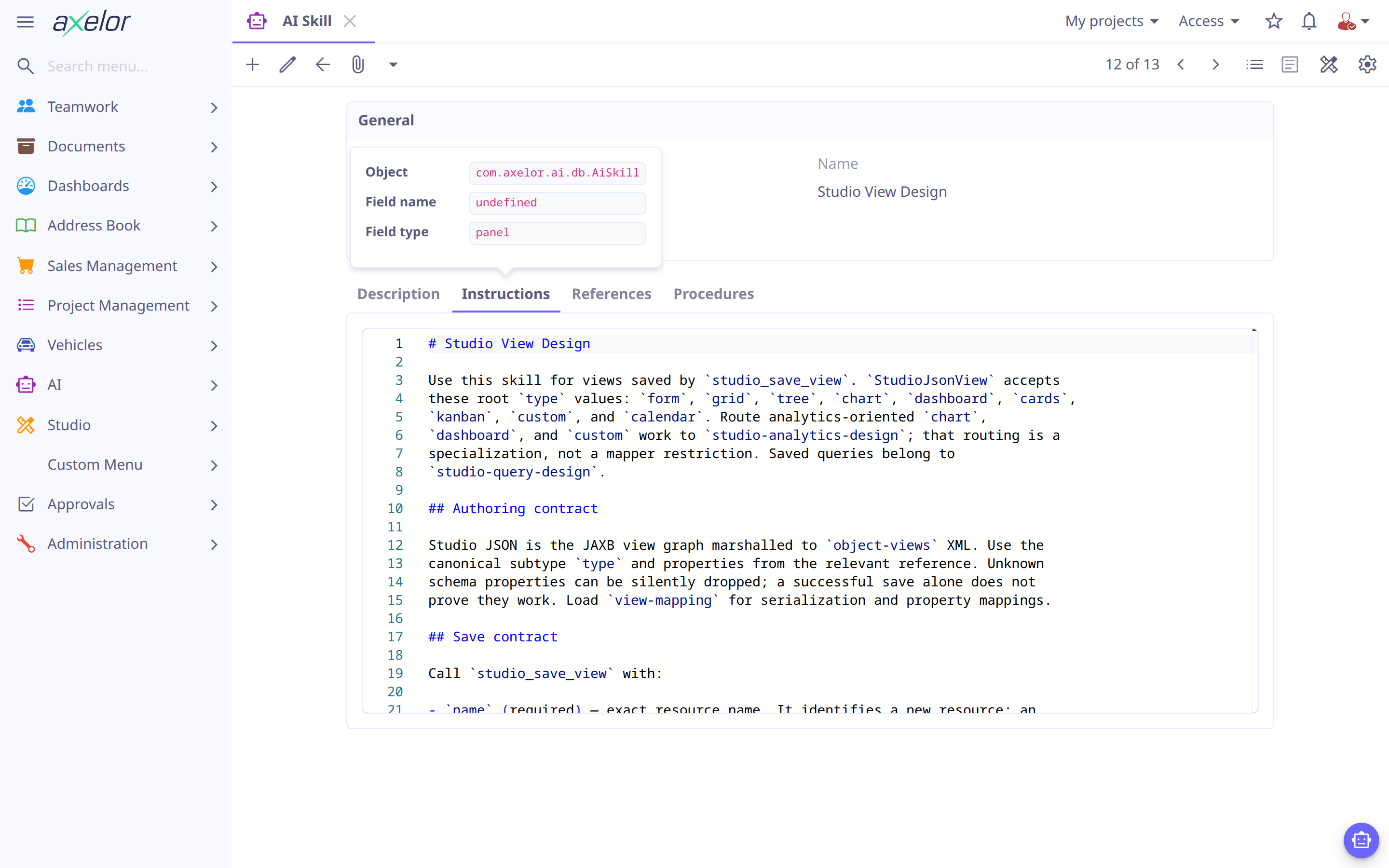
Progressive disclosure
A skill has three tiers, revealed as the model needs them:
-
Description — one or two sentences, always visible in the agent’s prompt. This is the routing signal: it must say clearly when to load the skill.
-
Instructions — the full guidance (markdown), loaded when the model calls
use_skillwith the skill’s code. -
References — named documents loaded individually, so the model pulls in only the detail it needs (e.g. a widget catalog, concrete examples) rather than the whole body at once.
This keeps the base prompt small — an agent can list many skills cheaply, because only descriptions are ever-present — while still offering deep instructions on demand.
The skill record
| Field | Meaning |
|---|---|
|
Unique identifier (referenced by agents and by |
|
The always-visible routing summary — write it to say when to load the skill. |
|
The full guidance, authored in markdown, returned when the skill is loaded. |
|
|
|
The procedures an agent linked to the skill can run with
|
|
Activation. |
Defining a skill as a seed file
A skill is a folder under src/main/resources/ai/skills/<code>/:
ai/skills/studio-view-design/
  SKILL.md                 (1)
  references/
    form-items.md          (2)
    widgets.md
    form-examples.md
procedures.yaml (3)| 1 | the skill itself — frontmatter + instructions |
| 2 | each file becomes an AiSkillReference, loadable on its own |
| 3 | optional — the skill’s procedures, checked against the forms when the skill is loaded |
SKILL.md carries the configuration in frontmatter and the instructions in the body:
---
title: Studio View Design (1)
description: |- (2)
  Detailed reference for building views with Studio — item types, JSON
  structure, widget catalog, and concrete form/grid examples. Load this skill
  when creating or modifying views with studio_save_view.
isEnabled: true
---

# Studio View Design (3)

Reference for the `schema` parameter used by `studio_save_view`.
...| 1 | the display name; the skill’s code is its folder name, studio-view-design |
| 2 | the always-visible description — keep it tight and say when to load |
| 3 | everything below the frontmatter is the instructions (markdown) |
Each references/*.md file becomes a reference: its filename is the reference name,
its frontmatter title the display title, and its body the content. The model loads
a reference by name after loading the skill.
Drop the folder in src/main/resources/ai/skills/ and restart, or use Reload built-in
defaults on the Import / Export screen. Records are also editable under
.
Give an agent a skill
List a skill’s code under an agent’s skills (or ["*"] for all). Listing a skill
only exposes its description; the model decides when to pull in the instructions with
use_skill, and then which references to read. See Agents.
A skill file can also name the agents to attach itself to, so a module adds a skill to an agent it does not own:
---
title: Quotation Rules
description: When and how to quote an order.
agents: [default-assistant]
---
The skill is added to those agents' skills, and what they already have is kept; an unknown agent code is logged and skipped.
Write effective skills
-
Put the when-to-load in the description — it is the only part always in context.
-
Keep instructions focused and example-driven; move bulky catalogs and long examples into references so they load only when relevant.
-
Prefer several small references over one large body, so the model fetches just what it needs.
| The description is the model’s routing signal. If a skill never loads when it should, sharpen its description before touching the instructions. |