Workflow Execution
How the engine behaves at runtime: what happens on a save, how runs are recorded and monitored, how parked runs wake up, and how to configure the scheduler.
What happens on a save
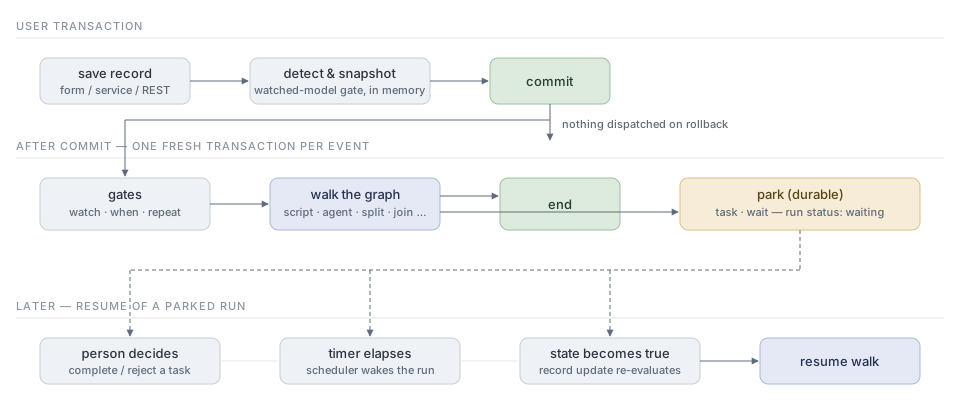
During flush, the engine detects changes and snapshots the record’s fields before
and after (custom fields included). Before commit it writes those snapshots to
MetaWorkflowCapture in the same transaction as the business change. A failed
capture write rolls back that change. Models without any dispatchable workflow
are filtered by an in-memory gate.
After the transaction commits, the captured events dispatch:
-
Each event runs in a fresh transaction of its own. A workflow failure can never roll back the user’s save, and one event’s failure does not discard another’s.
-
Per workflow, the gates run first —
watchprefilter,whencondition against the snapshots, repeat policy — then the graph walks fromstarttoend. -
Several workflows on the same model fire in
sequenceorder. -
A rolled-back transaction dispatches nothing.
| Records saved by a workflow script go through the same detection, so workflows can cascade; a re-entrancy guard prevents self-triggering loops within a dispatch. |
Capture recovery
After-commit dispatch and scheduler recovery use the same claim protocol. A
capture moves from pending to dispatching under a database-timed lease. Its
dispatched status commits in the same transaction as the workflow’s database
changes. A crash before that commit leaves a recoverable attempt, rather than a
completed marker without its work. The captured user is restored through the
execution and commit; an inactive or deleted user yields no user attribution.
Dispatch renews active claims; the scheduler recovers expired claims. The default
workflow.capture.lease-seconds is 300 (minimum 3); renewal runs every third of
that interval. Claim tokens fence both activity invocation and completion, so an
obsolete worker cannot commit its database changes.
Before executing email, agent, or script nodes, dispatch commits a separate
effectStarted marker. Scripts are conservative here: they can call services
whose effects are outside the workflow transaction. If such an attempt is
interrupted, its capture becomes outcome_unknown and is not replayed
automatically. Unmarked expired attempts return to pending. A caught dispatch
transaction failure is retained as failed, or outcome_unknown when marked.
Node failures successfully recorded by the engine still count as dispatched.
The effect marker uses a second database connection while the dispatch transaction
is open; allow connection-pool headroom for these independent commits.
Inspect unresolved MetaWorkflowCapture records, ensure the original worker has
stopped, and check the external systems before deciding whether to replay. The
administrator-only Java service method
CaptureDispatcher.reconcile(id, replay, reason) requires a nonblank reason:
replay=true queues the whole captured event again; false closes it as
resolved. The administrator, time, and reason remain on the capture. This
method refuses pending, active, and completed captures. There is no capture
reconciliation screen yet.
workflow.capture.retain-days defaults to 7 and removes only old dispatched
captures. Failed, unknown, and administratively resolved records are retained.
Registry eligibility is resolved at dispatch time; the captured registry stamp
is diagnostic and does not pin the definitions eligible when the event occurred.
This protocol covers record-trigger dispatch; it does not add activity-level
checkpoints or retries to other workflow entry points.
Monitoring runs
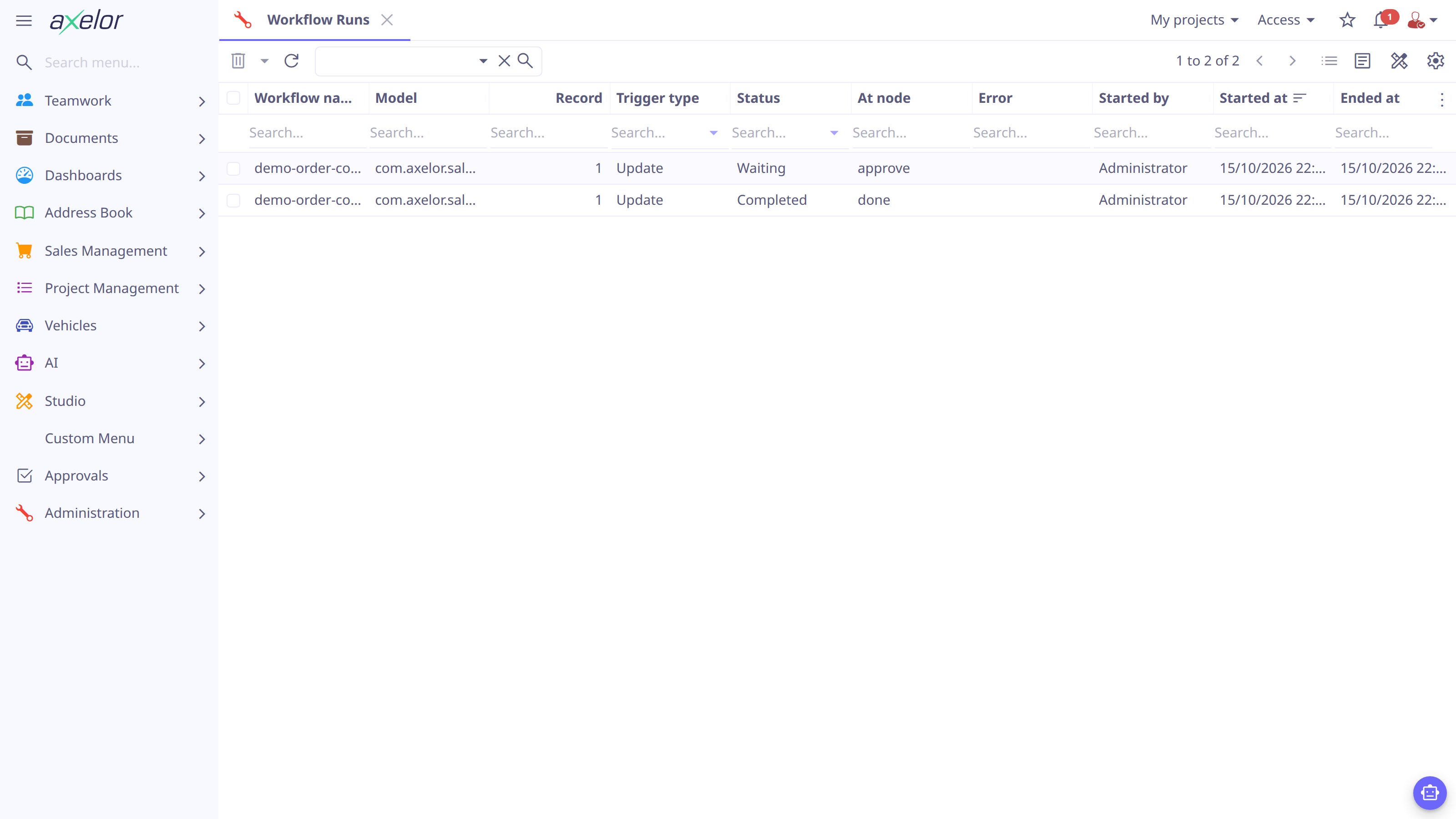
Runs are recorded with a bias for lightness: failed runs are always recorded, and parked runs persist while they wait — but successful (and gate-skipped) runs leave no row unless run tracing is enabled (see Engine options). To inspect runs:
-
Open Administration → Workflow Management → Workflow Runs (filters for Failed and Waiting runs are built in), or, from a record’s own form, the Workflow status icon in the toolbar — it appears once the record has runs, and becomes an hourglass, Workflow running in the background, while a background node on the record has yet to finish.
-
Open a run to see its trigger, timing, last node and any recorded error, and its Steps (every park at any trace level, every node at
nodes). The View graph button draws the run over its workflow.
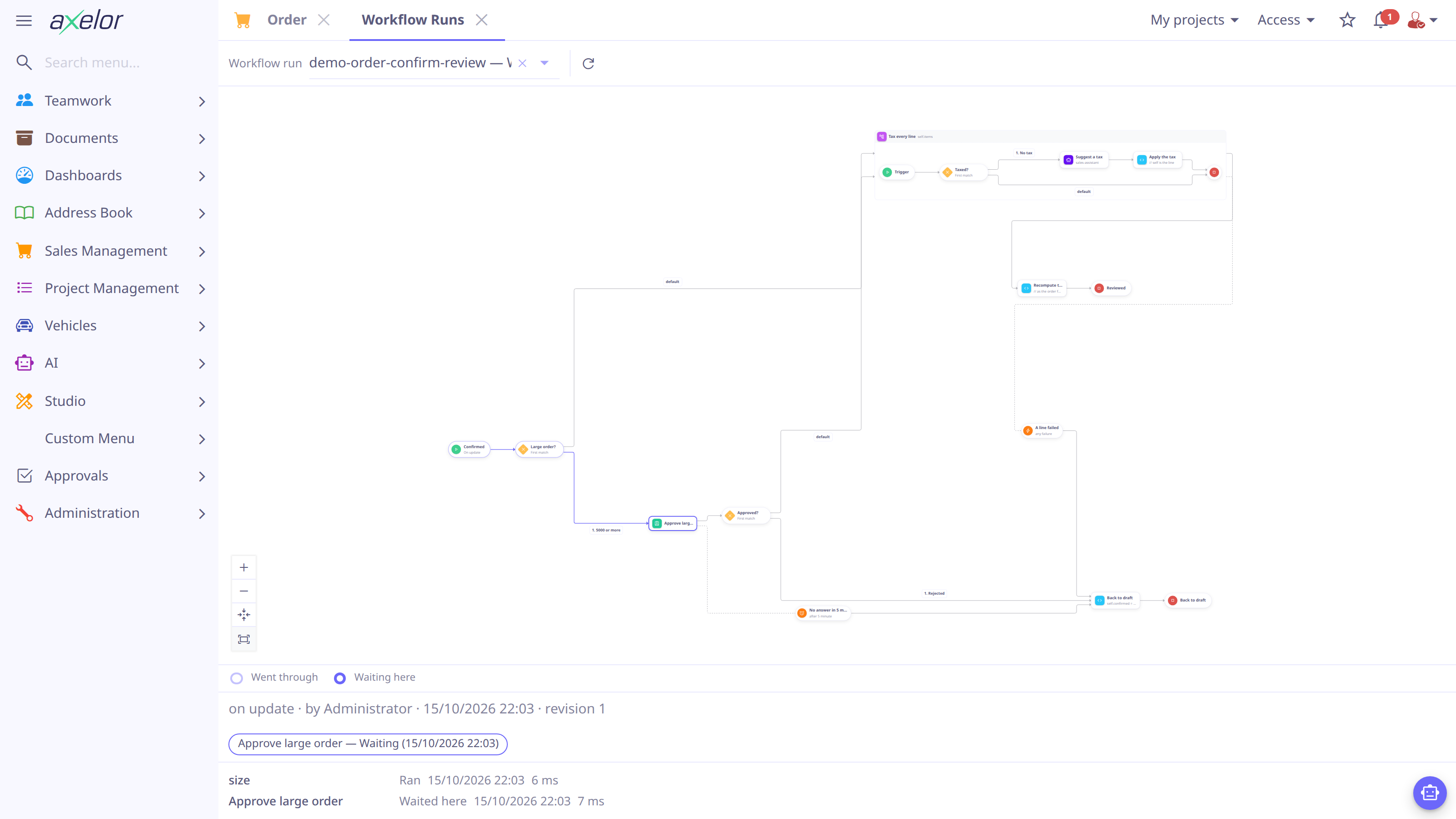
On the graph, each node the run touched is ringed by what became of it: a pale
ring for a node the run passed through, the same colour solid for one it is still
stopped at, amber for a branch a race cancelled, red for a failure, green for the
end it reached, and the edges the run took are drawn in the accent. With
tracing off only parks, failures and each split’s choice of flows are written
down; the nodes between them are ringed because the viewer replays the run over
its graph from those records, following a node’s only way out and never
deciding a condition again. When a run’s records cannot be replayed — an
operator moved it, say — only the recorded nodes are ringed. A key above the graph
names the rings the run wears (Went through, Waiting here, Cancelled,
Failed, Ended here), and the panel below it names every one of those states
in words, so nothing is said in colour alone. Each node’s tooltip adds how long it
waited and worked, how many passes it took, and which way it left: a park that a
boundary took reads "Left by" that boundary, and a failure an error boundary
caught reads "Failed, caught by" it. What a race is, and why a branch ends up
cancelled, is explained in
Branching and Joining.
| Status | Meaning |
|---|---|
|
the walk is in flight |
|
ran out of graph at an |
|
stopped by an |
|
parked on a |
|
a node raised an error (recorded on the run) |
|
gated off (e.g. the |
|
an admin abandoned a parked run (Cancel run, Migrate, or cancelling its approval), or the record it was about was deleted |
A run with a non-cancelling boundary that has fired lists them under Escape branches beneath its graph. Opening one of them opens its own run view, whose summary line reads "spawned by workflow's boundary boundary" instead of the "called by … at …" phrasing a called call uses.
The same menu also offers All Workflows (the loaded definitions), Workflow
States (durable trigger state, with a Retry for a state that errored), Workflow
Tasks (all human tasks) and, for administrators, Node Metrics — how often each
node ran and its average work and parked time, drawn from the node rows that
workflow.trace = nodes records.
How parked runs wake up
A run parked with status waiting resumes when its condition is met:
-
task— a person completes or rejects the task, or (withwhenandautoComplete) the record satisfies the condition on its own, with nobody acting. The run resumes from the task’snextwith thetaskbinding populated either way. See Gating approval on a condition. -
wait on="timer"— the scheduler wakes the run at its due time. A deadline written asuntilfollows its field when the record changes; adelaydoes not move. -
wait on="condition"— an update of the record re-evaluates the condition and resumes the run when it holds. -
waiton amessageorsignal— a<send>of that name (and, for a message, that key) elsewhere. A message sent before the run parked still reaches it until itsttlruns out. See send. -
a
<call>call activity — the child workflow it called reaches anend. The caller resumes from the call’snext; a child that fails fails the caller at the call. See call. -
a
<boundary>on any of them — a deadline elapses, a condition on the record becomes true, or the message or signal it listens for arrives. By default the park closes, a waiting approval is withdrawn (and a called workflow is cancelled), and the run continues from the boundary’s ownnextrather than the node’s. A boundary declared withcancel="false"fires without waking the park at all: the host stays parked, andnextinstead starts a second, independent escape branch beside it. See Boundaries.
A parked run stays bound to the exact definition that parked it, by its stable
xmlId, and resumes into the revision it pinned when it started — not into the
definition as it stands now. See When a definition changes under a parked run.
When a run ends early
A run can end before it runs out of graph: a terminate <end>, a branch that
failed, or the record it was about being deleted. Whichever it is, the teardown
goes all the way down.
Ending a run cancels every branch of every fork it had open, withdraws the
approvals it was holding — both the ones inside a fork and the one a plain
task parked on — clears its wake time, and then does the same for every
workflow it called and was waiting on, however deep. A caller is closed before
its children, so a child finishing mid-teardown cannot resume a caller that is
already over.
Deleting the record is the same teardown, reached a different way: the approvals
waiting on it are withdrawn from their inboxes, its parked runs become
cancelled along with anything they called, and its armed timers are disarmed —
there is nothing left to approve or to wake for. The run rows themselves are
kept: they are the record’s history, and outlive it.
Cancel run on a waiting run’s form is the same teardown again, for one run, and
needs write access to workflow definitions. It asks for confirmation first,
because it cannot be undone: the run becomes cancelled, and so does a run
waiting on it at a call. A run that an approver or a timer resumed in the
meantime is left alone, and the form says so.
Cleanup is driven by the entity delete event, so it does not see a bulk
DELETE issued through a query. Deleting records that way leaves their approvals
pending and their runs parked. Remove such records through the repository, or
cancel their tasks first.
|
When a definition changes under a parked run
A parked run finishes on the graph it started on. Every change that touches a definition’s XML mints a new revision, and a run pins the revision it began with, so editing a workflow can never move the runs already parked on it.
That means a graph edit needs no permission and disturbs nothing: the approvals waiting on it stay open and answerable, and each run walks to its end on the definition its approvers were shown. Runs started after the change get the new revision. Nothing has to be judged, carried forward or given up.
revision 1  ──run A parks at "approve"──────────────► A finishes on revision 1
                     │
   (the graph is edited: revision 2 is minted)
                     │
revision 2  ──run B starts ─────────────────────────► B finishes on revision 2
A run stays bound to its definition by a stable xmlId, so an override never
changes which workflow it belongs to, and a revision outlives the definition row
itself: undeploying and redeploying under the same identity continues the revision
sequence rather than restarting it, and a run mid-way through keeps the graph it
was walking either way.
An approval’s assignee and title are fixed when the run parks, so editing
them affects future approvals and not the ones already waiting. The same is true
of a <boundary> deadline: it is measured from the moment the run parked, on the
revision it pinned, so changing a delay in a later revision does not move a
deadline that is already counting.
|
Removing a definition, or undeploying it from Studio, is
still rejected while it has anything in flight — a parked run, a pending
task, or an armed timer/once trigger. A removal takes the identity with
it, so there would be nothing left for those runs to be deployed against.
Complete or cancel them first.
Bringing parked runs forward
Leaving a backlog on an old revision is the default, not the only option. When a change is one the runs already parked should follow — a node renamed, an approval that should now be someone else’s, a graph that was simply wrong — the workflow form offers Migrate, with the number parked on it. It appears only when something is actually parked, and it counts every revision, the current one included: a run can be moved to another node of its own revision, which is how a stuck one is unstuck.
Studio reaches the same dialog from the other end. When Deploy in the workflow designer (Designer) leaves runs parked on the revision it just replaced, it opens the mover on the revision it minted. That is sequencing, not a decision the deploy waits on: the deploy has already committed by the time the dialog appears, so closing it leaves the backlog exactly where the default leaves it, to be moved whenever you like from the workflow form.
The dialog picks one source revision and one target, and shows only that pair. A backlog spread over three revisions is worked through a pair at a time rather than read as one stacked list. The target can be any revision the workflow has ever had, not only the current one: moving a backlog back onto the last known good graph while a broken revision is fixed is a legitimate thing to want, and the rules are the same in both directions.
Each row is a position — a place in the graph where runs are sitting — not a run. A workflow with two thousand parked runs has a handful of positions, because where a run can stop is bounded by the graph rather than by the data, so the dialog stays the same size however large the backlog is. A row’s count opens a picker listing the runs behind it; nothing is selected until you select it, and a row with nothing selected does nothing. Applying an untouched dialog changes nothing at all.
Three things a row can ask for:
Move enters the target node as a fresh arrival. Nothing of the old park is
carried across: a timer restarts now from the target node’s own delay, and an
approval is opened afresh with the target’s assignee, title and deadline while the
old one is taken back. That is the honest reading — you picked the target graph, so
the target graph’s deadlines are what you picked — and it is visible to approvers,
whose task disappears and comes back.
Cancel gives the run up for good, and End finishes it as a success cut short, which is not the same thing: one is abandoned, the other reaches an ending. Neither replays a node’s effects.
|
A branch of a |
Applying is bounded: a large backlog comes back with what is left, and pressing Apply again continues. A run that an approver or a due timer reached first is reported as already moved on rather than forced. Every move is recorded on the park it closed — where the run went, and who sent it there — so the run viewer can explain a run that changed graphs instead of appearing to teleport between them.
Durable state
The engine persists state only where durability is unavoidable:
-
repeat="once"— one consumption row per (workflow, record). -
on="timer"— an armed timer row with its due timestamp; disarmed if the condition turns false before it is due. -
Parked runs — a
taskorwaitnode, acallwhose child parked, or asubflowsomething inside which stopped, parks the run row until resumed.
State rows are claimed with an atomic conditional update, so in a cluster
exactly one instance processes a due record. Claims carry a lease: a row claimed
by an instance that died is reaped and retried after stale-claim-seconds.
|
Configuring the scheduler
A single scheduler drives everything time-based: due timer triggers, wait
timers and task deadlines. It also offers sent messages to whatever is
listening, which is not time-based at all: a message that matches nothing yet has
no moment at which it becomes due, only a later poll at which a listener exists.
So it is offered again until it is taken or runs out of time, each poll taking
the rows offered least often so that none is left behind a message nothing
matches.
# poll interval in seconds (<= 0 disables the scheduler; default 60)
workflow.scheduler.interval = 60

# worker pool size (default: available processors - 2)
workflow.scheduler.pool-size =

# max due rows claimed per poll (default 1000)
workflow.scheduler.batch-size =

# seconds before an abandoned claim is reaped and retried (default 3600);
# must exceed the longest expected workflow execution
workflow.scheduler.stale-claim-seconds =

# seconds a node may hold a join before it is handed back (default 600);
# must exceed the longest join continuation
workflow.scheduler.join-lease-seconds =

# seconds before a background agent, email or script node that never ran is
# picked up by the scheduler (default 120)
workflow.scheduler.resume-grace-seconds =

# how many background nodes run at once, per server
# (default: the scheduler's own pool size)
workflow.scheduler.resume-pool-size =

# stable node identity used for claims in a cluster (default: generated)
workflow.node-id =
With the scheduler disabled, timer triggers, wait on="timer" and
task deadlines do not fire. Everything save-driven keeps working.
|
Monitoring a live node
Each application node registers a read-only MXBean in the platform MBean server:
com.axelor.workflow:type=Engine,application="<application.name>",node="<workflow.node-id>"
Connect with VisualVM, JConsole or JMC to inspect scheduler configuration and state, active and queued work, poll and execution outcomes, message totals, and stale-claim recovery. Polls and execution segments expose their last, average and maximum duration. Values are node-local and cumulative since that JVM started; getters read in-memory counters and never query the application database. The MXBean remains available when the scheduler is disabled, because save-triggered workflows may still execute.
Flight recordings also contain events under the Axelor / Workflow category:
-
com.axelor.workflow.SchedulerPollrecords a poll’s duration and outcome. -
com.axelor.workflow.Executionrecords a run or resume segment’s workflow, duration and outcome, including whether a failure was unexpected. -
com.axelor.workflow.NodeExecutionrecords the node id and type, duration, outcome, and whether a failure was handled or unexpected. Its default 10 ms threshold keeps long-running recordings compact; set its threshold to zero in the recording configuration when a complete node-by-node path is needed. -
com.axelor.workflow.MessageDeliveryrecords a message name, attempt, expectation, number of consumers woken, duration and outcome. -
com.axelor.workflow.ClaimRecoveryrecords how many abandoned scheduler state, task and join claims were recovered. It is emitted only when at least one claim is recovered. -
com.axelor.workflow.JoinExecutionrecords a durable join’s split and join nodes, duration and outcome.
The events deliberately exclude record identifiers, message keys and payloads, and exception text. Use the MXBean for current health and counters; use JFR to correlate slow or failed work with JVM CPU, allocation, lock and garbage collection activity over time.
Engine options
The remaining engine options, with their defaults:
# off: failures, parks and splits' decisions only (default)
# runs: also record successful and gate-skipped runs
# nodes: also record every visited node, its outcome and timing
# true/false remain aliases for runs/off
#
# Use runs or nodes as a development/debugging aid: history tables grow with
# every execution and require an application-specific retention policy.
workflow.trace = off

# how deep workflow cascades may go before the re-entrancy guard stops them
# (a workflow saving records can trigger further workflows)
workflow.max-depth = 10

# how many elements a multi-instance call iterates
# when it declares no maxSize of its own
workflow.iteration.max-size = 1000

# how many times a run may park at one task or wait node that declares
# no maxVisits of its own; 0 means no limit
workflow.node.max-visits = 0

# statement budget of the sandboxed trigger `when` evaluator
workflow.condition.max-statements = 100000

# how many trigger conditions one evaluator batch answers before it is rebuilt,
# so the statement budget stays one condition's own
workflow.condition.batch-size = 100

# the largest set of run variables a run may carry across a park, in characters
# of serialised JSON; over it the node fails and names the limit
workflow.vars.max-size = 16384

# how long a sent message keeps being offered to listeners that have not parked
# yet, in seconds, when the <send> declares no ttl of its own; 0 means never
# give up. This bounds the SENDER's retrying and nothing else — bound a
# listener with a timer boundary on the node that waits
workflow.message.ttl = 300

# the largest payload a <send> may carry, in characters of serialised
# JSON. Over it the node fails rather than truncating: a payload silently cut in
# half is worse than a send that says it was too big
workflow.message.payload-max = 8192

# how many turns a chain of messages may take with nothing outside the engine in
# between, before the sending node fails. A park on a timer, a condition or a
# task ends such a chain; a park on a message does not
workflow.message.max-depth = 10
When a run fails
A node error fails the run unless something catches it: the walk stops, and the run records the failing node and the error.
-
Find the run under Workflow Runs (status
failed) and read the error. -
Fix the cause — the definition, the failing node, or the data.
-
Re-run programmatically if needed — see Programmatic execution.
| Effects of nodes that completed before the failure are kept — a workflow is not atomic across nodes. Order nodes accordingly (e.g. notify last). |
A failure the definition expected need not end the run at all. Raise it by name
with fail(code, message) or an <end error="…"> and catch it with an error
boundary that routes somewhere useful, or leave the boundary’s code empty to
catch any failure of its node — see
Catching a failure. The node is still
recorded as failed either way, so a caught failure is still visible here.