Security
What the assistant can read, write and reach — and who has to agree before it does.
What bounds the assistant
Three checks gate everything the assistant reads or writes, and all must pass:
-
The acting user’s own Axelor permissions, exactly as if the user ran the operation by hand — see Per-user enforcement.
-
The agent’s permissions: what its job needs, set on the agent — see Agent permissions.
-
The restrictions in force: what the AI may never read, set centrally — see Restrictions.
None substitutes for another. An agent permitted * reaches everything the user can
see and change — and nothing more. Agent permissions and restrictions only ever narrow:
they cannot hand a user access to a model their own permissions deny.
Per-user enforcement
Every way the assistant reads or writes a record is held to the acting user’s own permissions — the platform’s permission records, and nothing else:
-
Model and row — every read, create, update and delete goes through the user’s model permission for that operation, and every read through their row filter, so a model-wide read permission is not permission to read every row. A record a filter excludes reads back as "not found," not as a distinct "forbidden." Administrators are exempt, as they are in the web client.
-
Field — a field rule’s
canReadandcanWriteflags decide, on every path, and administrators are held to them too, as the platform’s server-side checks hold them. A rule’shideIfandreadonlyIfare view attributes and play no part. A custom field is readable unless it names roles the user lacks, and writable when readable. -
Paths — a dotted path, in a query or a filter, is readable when every field along it and every model it enters is. A filter reads its field as surely as a selection does:
salary > 5000tells who earns more.
What the assistant asks for and may not read is refused, naming the field. What comes
along unasked — a record’s name field, a relation’s name, a tracked change — is
withheld and listed under $hidden on the value that would have held it, so the
model knows something is there and does not take the gap for "no data". A relation
into a model the user may not read is its id alone. A write naming a field the user
may not write is refused, the field named by its path (items[2].discount).
The same holds where no tool is called: a mentioned user’s details, the field a message was sent from, the record open beside the chat, and knowledge drawn from records — each held to the agent’s reach and the AI policy too. What the user configures or is shown rather than what the agent reads stays on the user’s permissions alone: which knowledge bases they may use, the pinned subject’s label in their chat list, where a recap may be posted, and a file they attach to a message, which is theirs to hand over. A record knowledge source declares the fields its template reads, the template renders from those alone, and a record’s text is shown only to a reader who may read the record and every one of them — see Knowledge.
A call with no user is refused, never treated as trusted: an assistant call always
runs as someone, a workflow <agent> node as whoever started the run. Nothing in
these checks swallows a failure either — a check that throws fails the call.
The assistant is stricter than the web client in three places, all deliberately: the activity it reads withholds tracked changes of fields the user may not read, which the activity stream in the browser shows; administrators are held to field rules, which the browser shows them past; and a query that selects no columns, which would return whole records, is refused.
A permission denial names the operation and the model — "you are not allowed to read User records" — so the assistant can relay a real cause instead of inventing one. It never names the rule, role or condition behind the denial: the user learns that access is missing, not the shape of the policy that withheld it.
Code an administrator wrote runs as that code always has, and is not filtered: script,
action, HTTP and MCP tools, a workflow’s prompt templates, a record knowledge
template’s own script helpers, and a form’s onChange and onSave when a procedure
runs it. What such code hands the model is its author’s decision. An agent’s
permissions do not narrow it either, and what it returns is not recorded as data that
entered the conversation (see What leaves with a conversation).
This is deliberate: such code reads through the platform’s own API, not through the assistant’s checks, and its result is whatever value it builds — the platform cannot tell which fields it came from. Checking it would mean either trusting a declaration an administrator must keep in step with the code, or treating every result as unknown data, which would bar the conversation from any model not cleared for everything. The administrator who writes the tool knows what it returns; granting it to an agent is the decision.
Agent permissions
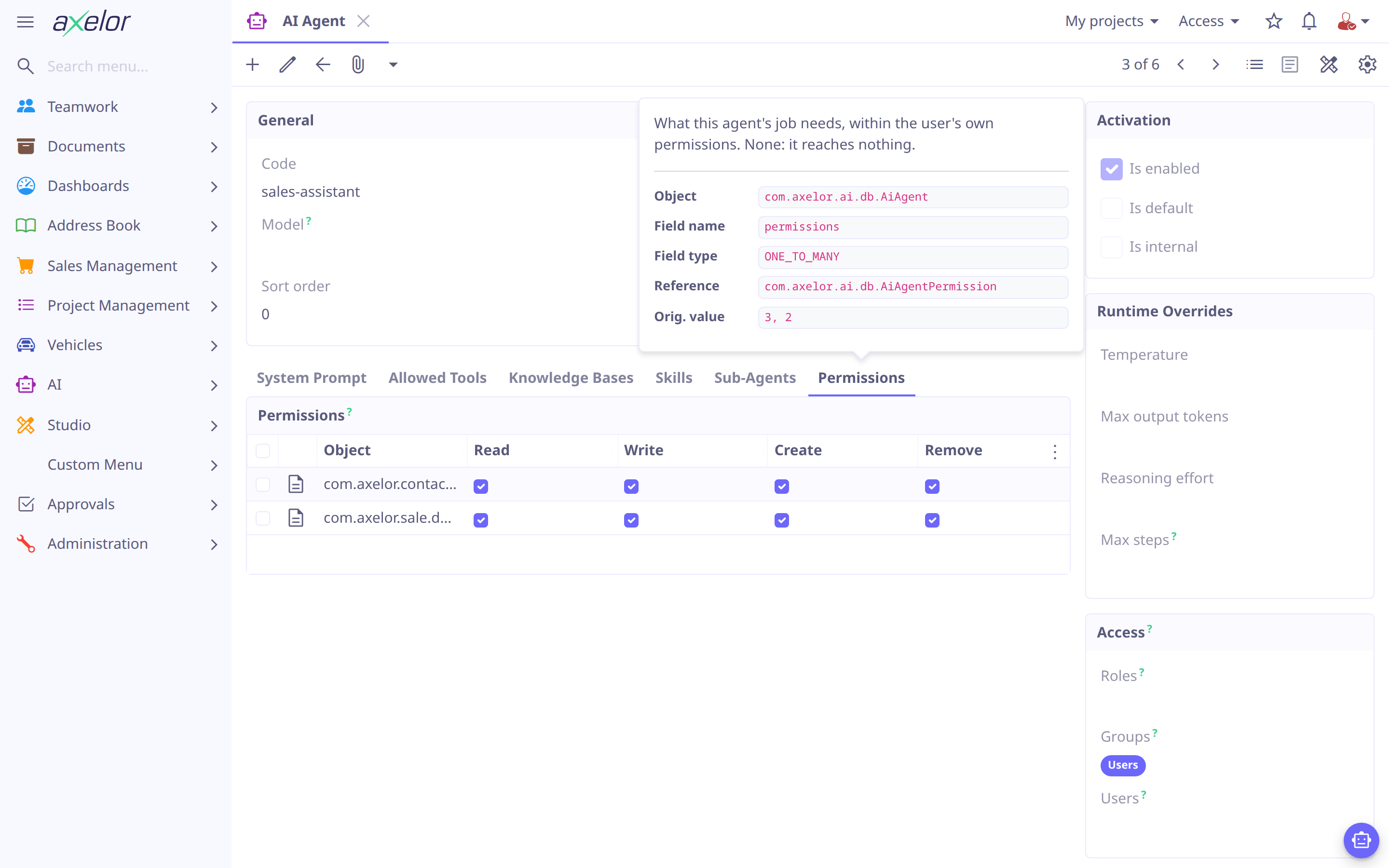
An agent reaches only the data models its job needs, listed on the agent’s Permissions tab — see Restrict what an agent can touch. Each row names an object and the operations the agent may do there:
-
Object — a model’s simple or full name, a package (
com.axelor.sale.db., not its sub-packages), a custom model’s name, orfor every model. A simple name is kept as the full name; one that two models share, or a model and a custom model, is refused. -
Read, Write, Create, Remove — the operations the agent may do on it.
An agent’s rows add up: * read and Order read update let it read everything and
change orders. An agent consulted by another is held to the permissions of every agent on
the way to it, so a narrow agent cannot reach further by consulting a broad one.
Agent permissions are fail-closed: an agent with no row reaches no data. Its
data tools are still offered, but every model is withheld: listing models returns none,
and a call that names a model is refused. Give * to an agent that should see everything
the user can.
|
Restrictions
Restrictions say what the AI may never read, whatever the user’s own permissions allow: "the assistant may not read `Employee.salary`", "payslips never reach the AI", "contact details stay off models hosted in the US". They hold only when the assistant acts; the same users keep full access in the web client. What the AI may change is not decided here: that is the agent’s permissions — see Agent permissions.
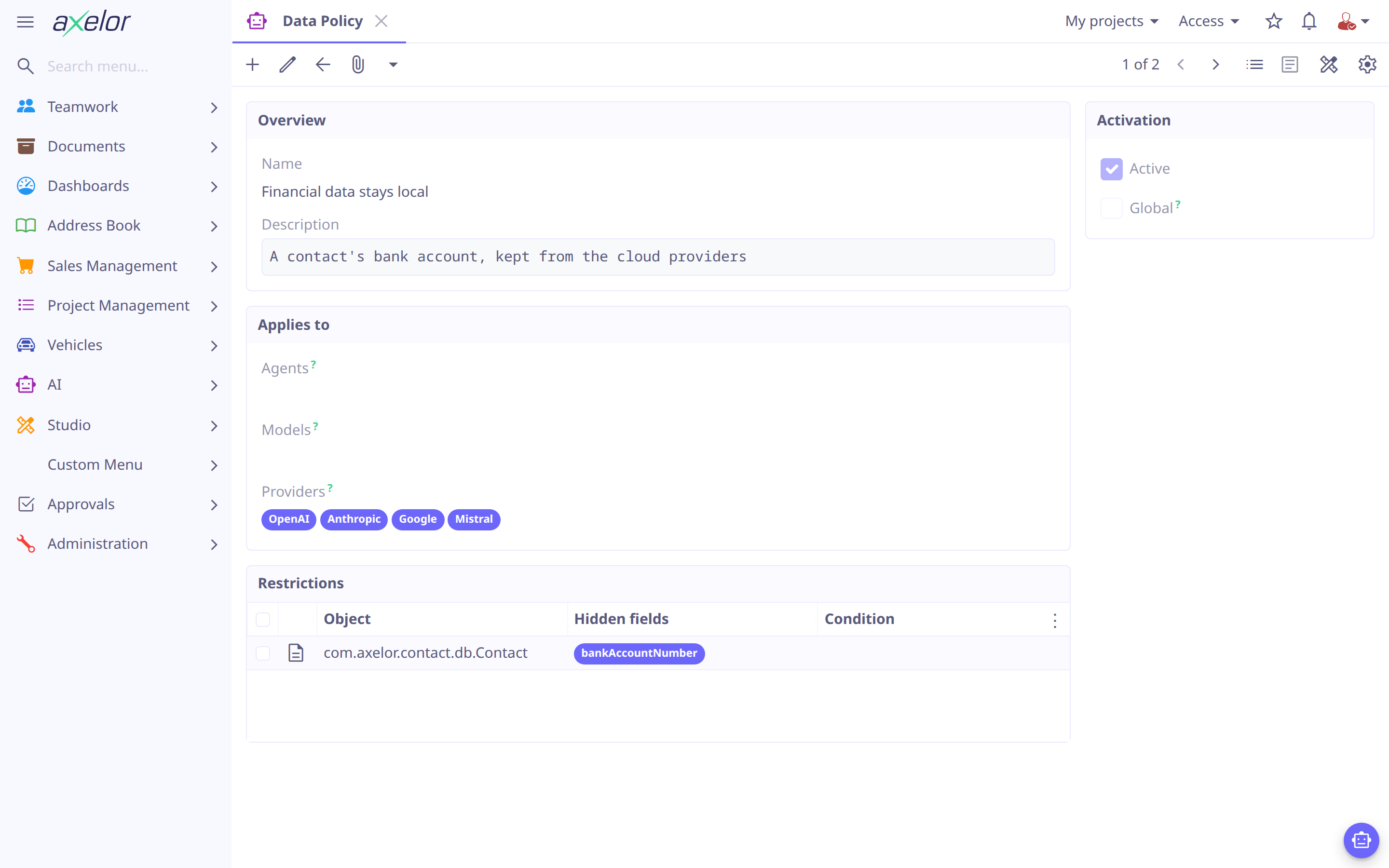
Restrictions live in data policies, under . A policy says both what it hides and where.
Write a policy
-
Open and click New.
-
Enter a Name, such as
Personal data. -
Under Applies to, either turn on Global, or list the Agents, Models and Providers it applies to.
-
Under Restrictions, click + and fill one:
-
Object — the model, as for an agent permission.
-
Hidden fields — the fields the AI may neither read nor write. Leave it empty to hide the whole model.
-
Advanced › Condition and Params — for a whole model only: the records hidden, as a permission’s condition — a filter on
self, with?for each param, evaluated for the user (user,user.group, …). Leave it empty to hide every record.
-
-
Click OK, then Save.
For example, to keep a contact’s email and phone from the AI, add a restriction on
Contact listing those two fields. To keep payslips from it entirely, add one on
Payslip listing nothing.
Only the fields listed are hidden: a field added to the model later is readable until
someone lists it. Fields are listed on one model at a time — a restriction on a package or
* hides whole models — and a condition only goes with a whole model, since a field is
hidden on every record or none.
|
Where a policy applies
A global policy applies to every AI call, including those of no agent: titles, summaries, recaps, embeddings and indexing. Otherwise a policy applies wherever any one of what it lists matches:
-
an agent — to what that agent reads, and what the agents it consults read;
-
a model or a provider — to what is sent there, whichever agent read it. The place for "contact details stay off US models".
A policy listing Sales and GPT-x hides its fields from everything Sales reads, and from everything sent to GPT-x — not only from Sales on GPT-x. A policy that is not global and lists nothing applies nowhere, active or not; the grid highlights it.
How restrictions combine
-
They add up. Every restriction in force applies, and none undoes another: there is no "most specific wins". A field any of them hides is hidden.
-
Which are in force: those of every active policy that is global, lists an agent of the chain, or lists the model the data goes to or its provider. The model is the one serving the turn — the one the user chose, else the agent’s, else the default. When no model can be found, every policy naming a model or a provider applies.
-
Rows: an operation on a model a conditional restriction hides is limited to the records outside its condition. A record the condition cannot tell — its value is null — counts as hidden.
-
Custom models: their records share one entity, which no condition can tell apart, so a condition on one is refused, as is a condition on
*. -
Administrators pass the user’s own model and row checks, as in the web client, but agent permissions and restrictions hold them like anyone.
A refusal says the assistant may not — "this assistant is not allowed to read User records", "… to read field(s) salary …" — so the user knows their own access is intact. It names neither the restriction nor the policy.
Policies can also ship as files in a module’s ai/ directory — see
Governance files.
What leaves with a conversation
A value the assistant was handed stays in the conversation: the next turn sends the history again, perhaps to a model the user switched to, and so do the background calls — the title, the subject, session notes, the compaction summary, a recap. So a conversation keeps the fields whose values entered it — from a record read, a query’s selected and filtered columns, the open form, a mention, record knowledge, an activity’s tracked changes — and every model call in it must be allowed to receive each of them:
-
A turn on a model that may not receive what the conversation holds is refused before any model is called, and the chat offers to start a new one. Every later call of the turn is held too: a consulted agent on another model may read data its caller’s model may not receive, and the turn then ends before the caller’s next call. A conversation’s data only grows: nothing un-marks it.
-
A consultation of an agent whose model may not receive the conversation is not made. The turn goes on: the calling agent learns why and answers without it, and the call’s error says so in the tool details.
-
A background call whose utility model may not receive it goes to the turn’s own model instead: titles and summaries keep working, only the cost changes. When neither may, the call is skipped.
-
A script, action, HTTP or MCP tool is not part of this: its result is not recorded, so it may go to any model the conversation uses. Grant such a tool only to agents whose models may receive what it returns.
-
Indexing a record knowledge source sends its declared fields to the knowledge base’s embedding model; one a restriction keeps from that model refuses the source, naming the field, and leaves it empty — chunks sent before the restriction are removed too. A restriction’s condition limits the records sent; one that needs a user to evaluate covers them all, and the source is refused. Only global policies and those on the embedding model or its provider apply there: no agent is indexing.
The check asks the agents' permissions and the restrictions alone — for the agents and the model — not the user’s own permissions again: a shared conversation’s transcript is shared by whoever prompted, and a member with fewer rights is not locked out of it. It is asked afresh each time, so a restriction changed later applies to conversations already under way.
| A file the user attaches and text they type are theirs to hand over: no restriction reads them. The same holds for a model’s own replies beyond what entered the conversation, and for the text of a knowledge query, which goes to the embedding model as typed. Every call, sent or refused, is recorded with the model it went to and the fields it carried — see Usage Policies & Logs. |
Approval
Approval & safety covers the safety levels
(READ_ONLY/WRITE/DESTRUCTIVE) and the requiresApproval flag that decide
whether a tool call pauses for approval. Two things sit on top of that gate:
-
actionLabelis presentation only — the verb on the approval button. ADESTRUCTIVEtool’s card is also styled as dangerous. -
Once someone other than the summoner has posted into the conversation, their text is untrusted from the agent’s point of view. From that point on, every mutating tool call the agent proposes needs the summoner’s explicit approval, overriding the tool’s own
requiresApproval=false— a solo owner-and-agent conversation pays none of this cost.READ_ONLYtools stay approval-free regardless;DESTRUCTIVEtools always require approval anyway.
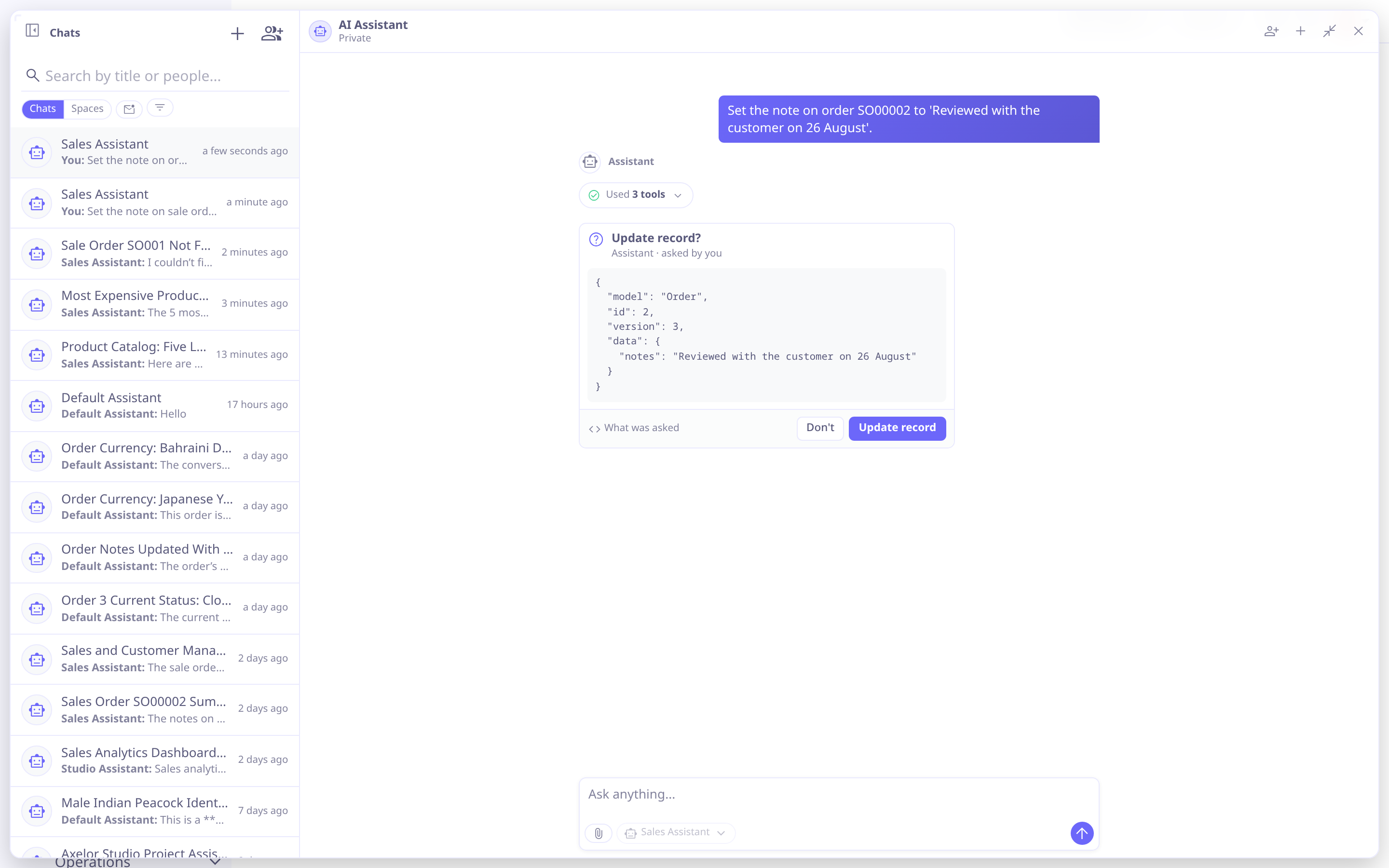
A paused call shows the tool’s actionLabel on the confirm button and, behind
What was asked, the exact arguments the model proposed — so what gets approved is
the call itself, not a description of it. Once decided, the card records who allowed or
refused it.
Untrusted text
Once a shared conversation has fresh text from someone other than the summoner, an internal risk-assessor agent screens it for prompt-injection and manipulation attempts before the target agent reads it. Findings surface as a notice to the summoner and are folded into the prompt as distrust anchors for the model.
This is a mitigation, not a gate: the screen fails open on any error or timeout, so a screening failure never blocks the turn. The approval escalation above is what actually stops a mutating call — the screen only makes the model, and the summoner, better informed going in.
Outbound network
HTTP tools and MCP servers are held to the same address defenses, so an internal service is never reachable by pointing either one at it — see HTTP tools and MCP servers for the rule and how each is configured. MCP alone additionally requires the host to be on an administrator’s allowlist before any connection is attempted at all, and pins the resolved address for the life of the connection.
Scripts
A SCRIPT tool’s JavaScript runs through the same engine, and under the same
Scripting Security Policy, as any other
script action in the platform — the same class allowlist/denylist and execution
timeout apply. Granting a SCRIPT tool is granting the agent model-directed code
execution, and should be treated with the same care as granting a person that
capability.
Programmatic callers
A workflow <agent> node — or any other caller that runs an agent without a chat
session behind it — never sees a CLIENT tool (there is no browser to execute one
in) or a tool that would need approval, even one whose requiresApproval is off by
default: DESTRUCTIVE tools always, and any WRITE tool or non-system mutating
tool with approval switched on. There is nobody to grant it. These tools are
withheld before the model ever sees them, and a call to one anyway is refused with
an error the model can recover from rather than left to stall the turn.
An agent invoked this way also receives a prompt-level instruction not to mutate data on its own — the workflow performs any persistence based on its answer instead. That instruction is a hint to the model, not an enforcement mechanism; the tool withholding above is what actually holds.
Secrets & audit
Provider API keys and tool/server secrets (AiProvider.apiKey, AiTool.secrets,
AiMcpServer.secrets) are stored encrypted and masked as passwords. Conversation
content (AiChatMessage) is not separately encrypted — it is a plain column,
governed by ordinary Axelor field and row permissions like the rest of the
application’s data, not by any AI-specific protection.
Every LLM call is logged to AiUsageLog with its model, provider, token counts and
latency, attributed to the calling user and, for a chat call, the conversation —
see Usage Policies & Logs. The log records tokens and latency,
not a computed cost.