Tools
A tool (AiTool) is a capability the model can invoke during a conversation —
reading and writing records, calling an API, running a script, or asking the user
something. Each tool declares a JSON input schema and can require the user’s approval
before it runs.
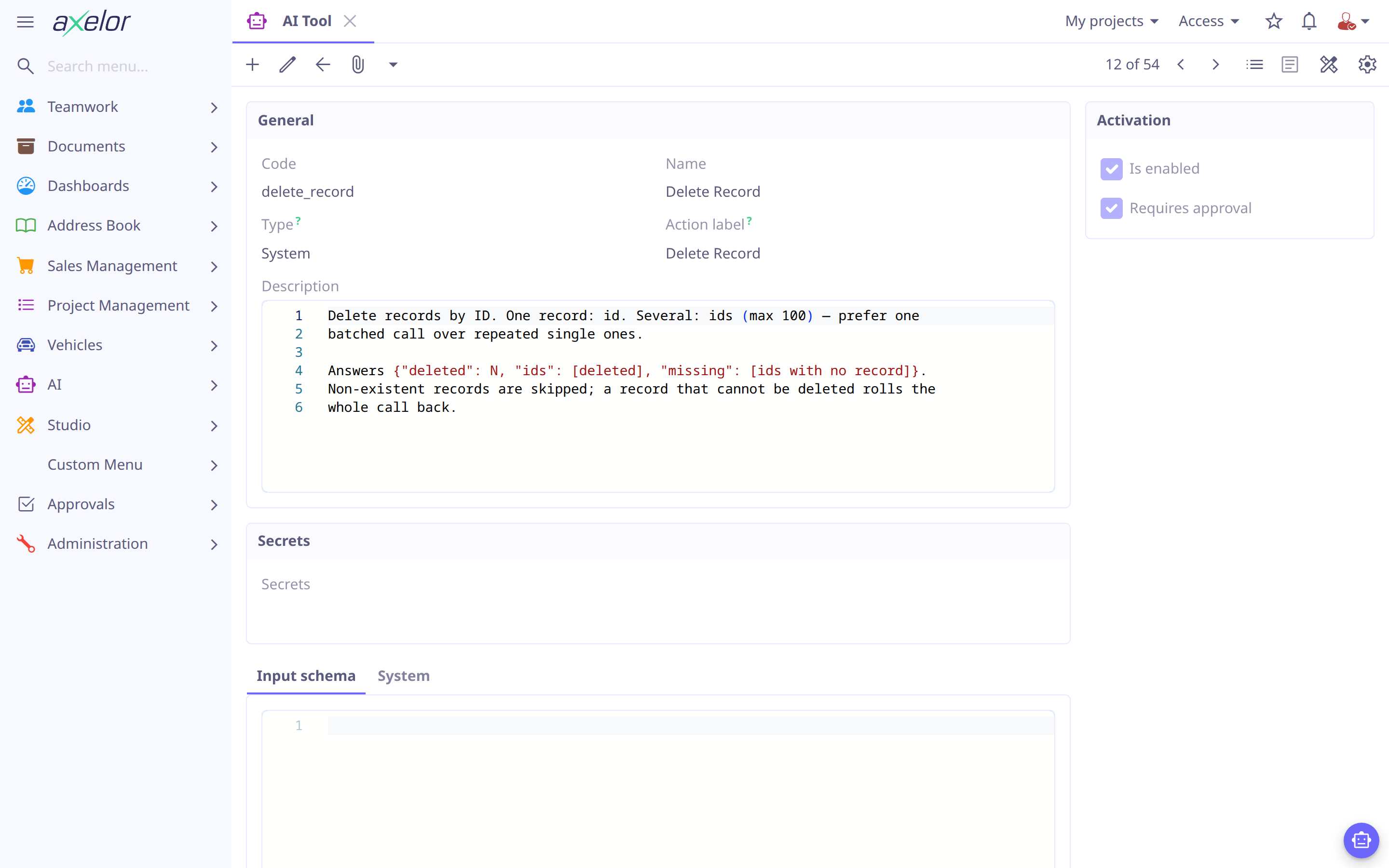
Add a tool
Most of what an agent needs is already built-in (SYSTEM tools) — data access,
metadata, knowledge search, the whole Studio builder. To use one, just list its code
under an agent’s tools (see Agents).
To add your own capability, pick a type and define it:
-
HTTP — call an external API
-
Script — run JavaScript
-
Action — run an existing Axelor action
-
Client — a UI interaction (ask the user, open a view)
Tools published by a remote MCP server are not written by hand at all: connect the server and synchronize it (see MCP servers).
Then declare its input schema (what the model must supply) and decide whether it
needs approval. Tools are seeded from YAML in src/main/resources/ai/tools/ (one
file per tool) or created under . A built-in tool only
names its key:
code: describe_model
name: Describe Model
type: SYSTEM
systemTool: describe_model
isEnabled: true| Grant an agent a focused set of tools. A large, overlapping tool list makes the model’s tool selection worse — expose only what the agent’s job needs. |
The tool record
| Field | Meaning |
|---|---|
|
Unique identifier (referenced by agents) and display name. |
|
|
|
What the tool does — this is what the model reads to decide when to call it. Write it for the model. (SYSTEM tools supply their description from code.) |
|
JSON Schema for the arguments the model must produce. |
|
Whether a |
|
The approval card’s button verb (falls back to Allow) — see Approval & safety. |
|
JavaScript body, for |
|
Request definition, for |
|
The Axelor action to run and its model, for |
|
The built-in tool key, for |
|
The MCP server the tool came from and its name on that server, for |
|
Secret values (e.g. API keys) referenced from HTTP definitions; stored encrypted. |
Tool types
- SYSTEM
-
A built-in tool implemented in Java; its description and schema come from the code, so the record only names the
systemToolkey. These cover data access (search_records,query_records,read_record,create_record,update_record,delete_record,save_query,read_activity), charts and tables in the answer (show_data, see Data widgets in answers), metadata (describe_model,list_models,resolve_view), the caller’s own identity (current_user), knowledge (search_knowledge), skills (use_skill), consulting another agent (consult_agent, added to any agent that has sub-agents), form procedures (run_procedure, see Procedures), the Agent Builder (inspect_ai_config,inspect_process,save_agent,save_skill,save_tool,try_agent, see Agent Builder), and the Studio builder (studio_*). See Extend with a custom SystemTool to add your own. - CLIENT
-
Handled by the web client rather than the server — asking the user for input or confirmation (
ask_to_input,ask_to_select,ask_to_continue), opening or refreshing views (open_view,refresh_view), and reading/writing the open form (get_active_form_data,set_active_form_data,trigger_action,trigger_save). - SCRIPT
-
Custom logic in JavaScript. The script runs in the standard action-script scope with the model-supplied arguments bound as
input, and returns a value that becomes the tool result. The usual scripting globals are available —repo,beanand bare model names — while request-scoped helpers such asuseranddateare not. See Script Action for the scope, and Scripting Security Policy for what it may and may not do. The seededcalculatetool (arithmetic andMathfunctions such asmax,roundandsqrt) is an example of one. - HTTP
-
A call to an external API — see HTTP tools.
- ACTION
-
Runs an existing Axelor action (
actionName) on a model (actionModel), bridging the assistant to logic you already have. - MCP
-
A tool hosted by a remote Model Context Protocol server, discovered by synchronizing that server rather than written by hand — see MCP servers.
Only SYSTEM tools are held to data access rules. A SCRIPT, ACTION,
HTTP or MCP tool returns what its author wrote it to return: an agent’s
permissions do not narrow it, restrictions do not filter it, and its result is not
counted among the fields that entered the conversation, so it may go to any model the
conversation uses. Grant one only to agents whose models may receive what it returns —
see What leaves with a conversation.
|
Record batches
The record tools take one record or several. create_record and update_record accept
records in place of their single-record parameters; read_record and delete_record
accept ids in place of id. A call carries the singular form or the plural one, never
both, and at most 100 records.
One batched call is preferable to the same work split across many: it is one round trip,
and one approval. It is also one transaction — a tool call that touches data runs in one
of its own — which makes a write batch all-or-nothing. If a record cannot be written, the call is rolled
back and the error names the item’s index rather than leaving a part of the batch
behind. read_record and delete_record list IDs that matched no record under
missing; for a delete that is not an error, only the rest of the batch goes through.
update_record answers with each field the call set, the value it held before and the
one it holds now, as the user may read them, so a value the save adjusted or did not
take shows without reading the record again.
Data widgets in answers
show_data lets an agent answer with a chart, table, KPI, card, list, progress bar,
flow or pivot instead of a markdown table. The agent gives a query, either a saved one
by queryName or an ad-hoc one in the shape query_records takes, and one widget with
its props as JSON:
{
  "model": "com.axelor.sale.db.Order",
  "query": {
    "from": { "model": "com.axelor.sale.db.Order", "as": "self" },
    "select": [
      { "field": "self.status", "as": "status" },
      { "fn": "COUNT", "field": "self.id", "as": "orders" }
    ],
    "groupBy": [{ "field": "self.status" }],
    "meta": { "columns": [
      { "name": "status", "title": "Status" },
      { "name": "orders", "title": "Orders" }
    ] }
  },
  "widget": "chart",
  "props": { "type": "bar", "x": "status", "series": [{ "field": "orders" }] },
  "title": "Sale orders by status"
}
The tool runs the query as the user, with their permissions and row-level filters, capped at 100 rows, and returns the result with the widget. The chat draws it inside the answer, where the agent called the tool, as a card with the text about it underneath. The agent reads the same rows, so one call both shows the data and informs what it writes.
-
One widget per call. The chat column is narrow and an answer reads top to bottom; several headline numbers are one
cardover one row, not several KPIs. -
Props are data, not code. They are the data widgets' props (see Data Widgets) without
data, callbacks or a height. Nothing the agent writes runs in the viewer’s browser. -
Wrong props are refused. An unknown widget or prop, a list of fields in the wrong shape, or a field the result does not have comes back as an error naming what is valid, so the agent corrects the call rather than drawing an empty chart.
-
Capped, and it says so. The result holds at most 100 rows. When the query returned more, the result is marked truncated, and the agent narrows or aggregates the query rather than describing the rows as the whole answer.
-
Amounts keep their currency. A column names the column holding each row’s currency code (
currencyFieldinmeta.columns), and every row shows in its own currency; amounts in different currencies are never added together. See Data Queries. -
Once shown, it stays. The result is stored with the message like any tool output: reopening the chat draws the same rows, with the time they were retrieved, and nothing runs the query again. For current numbers the user asks again.
-
The chat is the boundary. Anyone who can read the conversation sees the widget, as they see the rest of the answer. A column showing a selection or enum field shows its titles; the others show what the query’s
meta.columnsdeclare.
Input schema
inputSchema is a JSON Schema object describing the arguments the model must supply;
it is sent to the model as the tool’s parameter definition, so field description`s
matter. Describe what the tool returns in its `description, which is what the model reads.
A SYSTEM tool does not need one: its schema is generated from the Java record that
reads its input, which is the description that cannot go stale. Give one only when the
record cannot express the shape — a document rather than a set of parameters, as in a
query definition — because a stored schema wins over the generated one, and then the
two have to be kept in step by hand. A record can express more than it looks: one that
contains itself, like a filter condition holding nested conditions, is written once
under $defs and referred to from inside, and a component typed Object is described
as the union of what JSON can hold rather than guessed at.
Where every object in a tool’s schema says which properties it has, the tool is sent as a closed schema, and a provider that samples against it cannot produce a parameter the tool does not take or a value outside an enum. A tool whose input includes a free-form map is sent open: closing it would forbid the very keys it exists to carry. This is decided per tool, from the schema itself — there is nothing to configure.
The schema is what the model is asked for; the server does not assume it got it. Input is read strictly, so a parameter a tool does not take fails the call and is named along with the ones it does. The built-in record tools go further and check the ask against the model before acting: a field name it does not define, a value outside a selection, a filter the search cannot express. Each is refused, naming what the model does have, so the caller corrects itself instead of receiving a plausible answer to a question it did not ask.
A free-form map is the exception — a view or workflow document is read leniently by design, so an unknown property inside one is dropped rather than refused. See Reading what a tool refused for finding these in the log.
{
  "type": "object",
  "properties": {
    "latitude": { "type": "number" },
    "longitude": { "type": "number" }
  },
  "required": ["latitude", "longitude"]
}
Approval & safety
Built-in SYSTEM tools carry a code-assigned safety level that governs whether the
user must approve them before they run:
| Safety | Behavior |
|---|---|
|
Never needs approval — searches, reads, describes. |
|
Follows the tool’s |
|
Always needs approval, regardless of the flag. |
SCRIPT, HTTP, ACTION and MCP tools have no safety level: they follow
requiresApproval. A DESTRUCTIVE tool’s approval card also warns that it cannot be
undone.
Permissions are enforced on top of that, per user rather than per agent, and a tool that reaches a record by ID checks them for that record. The model-level check does not cover it: a permission whose access is conditional passes, since deciding row by row is what the condition is there for.
What a refusal says depends on what the caller can already see. A record they may read but not write is refused by name, which tells them nothing they could not read for themselves. A record they cannot read at all is reported exactly as an ID that does not exist — missing for a read or a delete, "no record found" for an update — because a denial would confirm that it exists. Losing access to the model as a whole is still a denial naming the operation and the model.
A delete settles permission for every ID before removing any of them, so a batch carrying one record the caller may not delete removes none of them.
Searches are filtered the same way, including over custom models: their records are all
MetaJsonRecord rows, so that entity is where their row-level permissions are carried.
Custom SCRIPT, HTTP and ACTION tools have no safety classification — they are
gated purely by their own requiresApproval flag. When approval is needed the chat
shows the pending call inline and waits for the user to confirm. In a shared
conversation that user is the member who asked, never any other member — see
Tool approval.
This is the safety net for writes — a model can propose a change, but a person
authorizes it. Leave requiresApproval on for tools that mutate important data.
|
A batched call is approved once, for the whole batch: the card names the records it would touch and their count, so the scale of what is being authorized is visible before the decision — see Record batches.
HTTP tools
An HTTP tool turns an API into a callable capability. The URL, headers and body may
interpolate the model’s input with ${input.field} and the tool’s own credentials with
${secret.name}:
code: city_weather
name: City Weather
type: HTTP
description: |-
Get current weather and 7-day forecast. Use city_geocoding first to get
coordinates.
requiresApproval: false
httpMethod: GET
httpUrl: https://api.open-meteo.com/v1/forecast?latitude=${input.latitude}&longitude=${input.longitude}¤t=temperature_2m
inputSchema: |-
{
"type": "object",
"properties": {
"latitude": { "type": "number" },
"longitude": { "type": "number" }
},
"required": ["latitude", "longitude"]
}
isEnabled: trueIt runs outside the transaction the rest of a tool call runs in, as an MCP tool does: its
work is a request to someone else’s server and it has nothing of its own to commit, so a
slow endpoint holds no database connection while it thinks. It waits 30 seconds for an
answer, or as long as ai.tool.http.timeout says — without that, an endpoint that accepts
the connection and then goes quiet holds the whole turn behind it.
Credentials
secrets holds a JSON object, stored encrypted:
{ "apiKey": "…", "token": "…" }Each property is available to the URL, headers and body as ${secret.<property>}. The
field is never written to an export and never read from a seed, so it is set on the tool
record itself and stays out of version control.
Secrets are filled in before the model’s input, never after: an input value is chosen by
the model, and one carrying ${secret.apiKey} must stay the text it is rather than
become the key. On the way back, every secret is taken out of the tool’s error — as
written and as URL-encoded — because an endpoint that echoes the query string it was
called with would otherwise hand the credential to the model, and the transcript keeps
what the model reads.
Outbound network
Before a request goes out, its URL is checked: the scheme must be http or https,
it may not carry credentials (user:pass@host), and every address the host resolves
to is checked against the private, loopback, link-local, multicast and
carrier-grade-NAT ranges — an internal service is not reachable by pointing a tool at
it, and a handful of literal localhost aliases are rejected outright before that
lookup even runs. This is the same address check MCP servers are held to (MCP servers);
see Security for how the two relate. Unlike MCP, an HTTP
tool’s host is not gated by an administrator allowlist — anyone who may create or
edit an HTTP tool can point it at any public host, so treat that capability with
the same care as SCRIPT.
MCP servers
An MCP server publishes a set of tools over the network — a GitHub server exposing
create_issue, a documentation server exposing search_docs. Instead of re-writing
those as HTTP tools, connect the server once and let Axelor discover them: each
remote tool becomes an ordinary AiTool row of type MCP, so it goes through the same
allowlist, approval and audit path as everything else.
Allow the host first
Outbound MCP connections are refused unless the host is on an allowlist in
axelor-config.properties, so nothing can be reached by editing a record alone:
ai.mcp.allowed-hosts = mcp.example.com, mcp.vendor-b.comThe URL must use HTTPS, and redirects are not followed so that a redirect cannot escape the allowlist.
| With the setting empty — the default — every connection fails with "Host is not on the MCP allowlist". This is deliberate: reaching a new server is an infrastructure decision, not a data-entry one. |
| The allowlist cannot open up an internal address. A host resolving to a loopback, private, link-local or multicast address is refused with "Blocked destination address" even when allowlisted, and no setting overrides this — it stops the AI engine being used to reach the server’s own network. An MCP server on your LAN therefore has to be published under a public HTTPS hostname, typically through a reverse proxy, before Axelor can connect to it. |
Connect the server
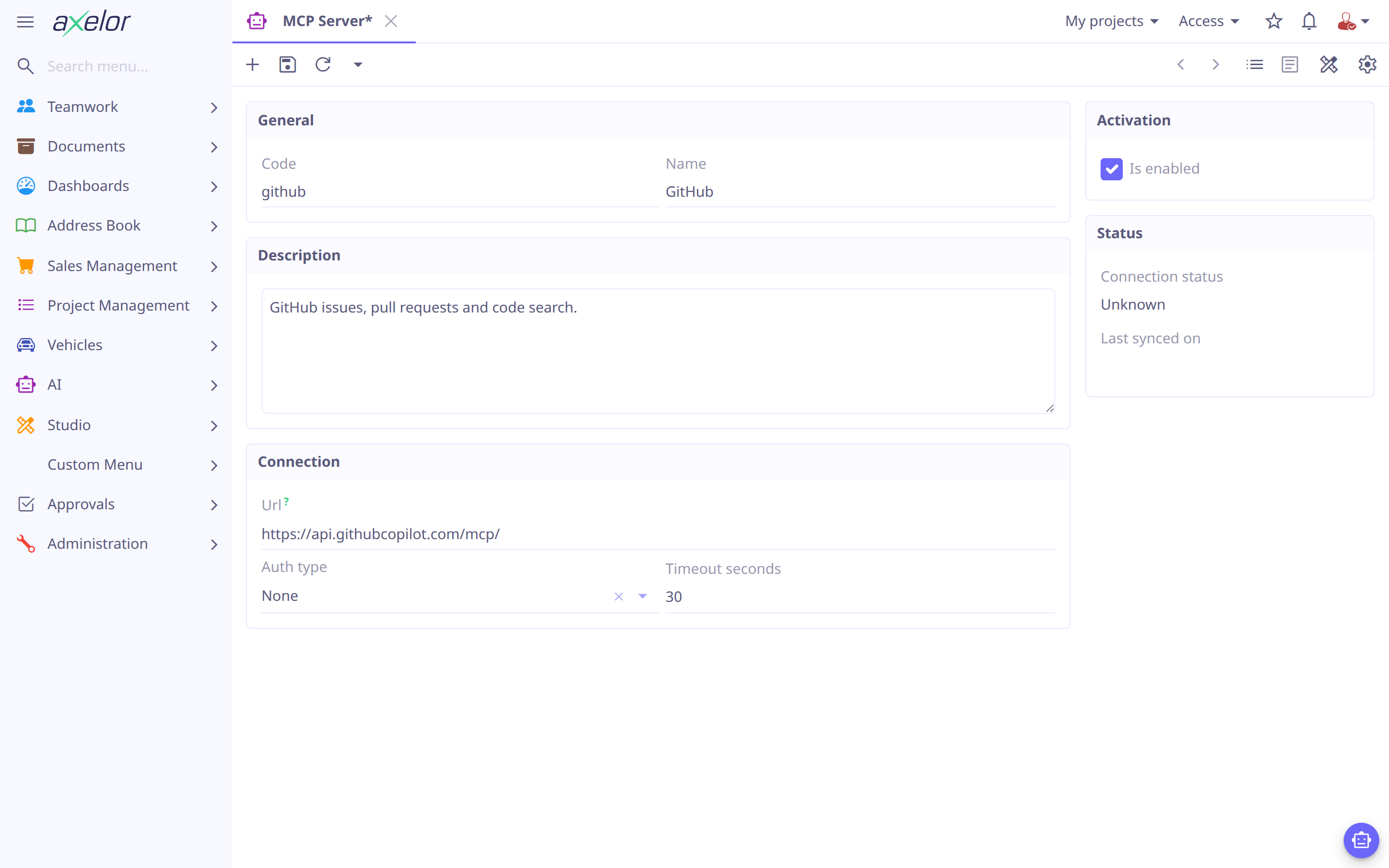
Open and create a record:
-
Code — a short slug such as
github. It prefixes the code of every tool synced from this server, and is locked once saved so existing tool codes stay valid. -
URL — the server’s Streamable HTTP endpoint. The deprecated HTTP+SSE transport is not supported and is not detected: such a URL simply fails to connect.
-
Authentication —
None,Bearer token, or aCustom header. The credential goes in Secrets as JSON ({"token": "…"}, or{"name": "X-Api-Key", "value": "…"}) and is stored encrypted. Your Axelor session is never forwarded to the server. -
Timeout — seconds allowed for connecting, discovery and each tool call.
Click Test connection to verify the endpoint and credential; the result is kept in Connection status.
Synchronize its tools
Synchronize tools fetches the server’s tool list and reconciles it, reporting what it did — added, updated, disabled, and anything skipped with the reason. The resulting tools are listed at the bottom of the server form, with each tool’s remote name and flags:
-
New tools are created enabled, with
requiresApprovalon. Review them before use: a remote server’s own description of a tool is untrusted text. -
Existing tools have their description and schema refreshed. Your
isEnabledandrequiresApprovalchoices are never overwritten. -
Tools the server no longer offers are disabled, not deleted, so an agent that referenced one keeps working after the server comes back. They are never re-enabled automatically — that stays your decision.
-
A tool whose schema uses a construct the engine cannot represent (
oneOf,anyOf,const, a nullabletypearray, a non-object root) is skipped and reported rather than silently degraded, and disabled if it had been synced before.
| Discovery is all-or-nothing. If the server fails halfway through, nothing is touched and the sync date is left alone — a half-read list must never look like "the other tools vanished". |
Give an agent access
Synced tools are not granted to anyone by default. On the agent’s Allowed Tools tab either add them individually, or pick the server in MCP server and click Add MCP tools to insert all of its enabled tools at once.
The bulk insert is a one-time action: tools discovered by a later synchronization are
not granted automatically, so a server that grows a delete_everything tool cannot
hand it to your agents. Run the action again when you want the new ones.
| Disabling the server record hides its tools from every agent and refuses outbound calls immediately, without touching each tool’s own flag — the quickest way to cut a server off. |
Extend with a custom SystemTool
SYSTEM is not a closed list. It is a Guice Multibinder set — a Java capability
becomes a SYSTEM tool by implementing the interface and adding one binding:
public interface SystemTool<T> {
  String code();                                  // matches the AiTool's systemTool key
  String name();
  String description();                           // what the model reads to decide
                                                    // when to call it
  Class<T> inputType();                            // Void.class if the tool takes none

  ToolResult execute(T input, ToolContext context);

  default ToolSafety safety() {                    // READ_ONLY, WRITE (default) or
    return ToolSafety.WRITE;                       // DESTRUCTIVE — see <<approval>>
  }

  default String callTitle(T input, String name) { // what the chat calls this one
    return name;                                   // call — see below
  }

  default String provideContext() {                // see below
    return null;
  }
}
Multibinder.newSetBinder(binder(), SystemTool.class)
.addBinding().to(MyCustomTool.class);Then seed an AiTool with type: SYSTEM and systemTool set to the same code(),
exactly as for a built-in one.
Four more hooks are optional. runsOutsideTransaction() is for a tool whose work is
several steps, each committed on its own; every other tool runs in the one transaction
that makes its writes atomic. undoneByRollback() answers false for a tool that also
changes something a rollback cannot reach — a cache, a registry of what is deployed —
and a trial run then does not run it. refusal()
refuses every call of a tool the user may not use at all, and beforeApproval() refuses
a call before the user is asked to approve it, or says what its approval card shows, so
a refusal known up front costs the user no decision.
callTitle() names one call of the tool in the chat’s list of what ran. One call is not
like the next — a tool that takes one record or fifty cannot be named accurately by its
configuration alone — so the tool is handed the call’s input and the name the
administrator gave it, and answers with whatever should be shown. Returning the name, as
the default does, leaves the tool named the way it was configured. The title travels with
the call, so it is what the transcript shows when the conversation is read back.
A tool whose output the chat draws for the reader, as show_data’s is, returns
`new ToolResult.Success(output, true). A shown output is kept whole even when the same
result comes back twice in a turn, and when a consulted agent shows it, the parent is
told it is already in the answer, so it does not show it again.
provideContext() runs once per assigned tool before the model call, and its
returned text — if non-null — is injected straight into the system prompt. Use it for
state the model would otherwise have to spend a tool call learning — which record is
on screen right now, say — rather than asking; a tool with nothing worth stating up
front simply returns null, the default.