DMN Deployment and Execution
Introduction
DMN models must be deployed before they can be executed. Deployment registers the decision definitions with the Camunda DMN engine. Once deployed, decisions can be executed either independently (via the execution wizard) or from a BPM process (via a Business Rule Task).
Deployment
Triggering Deployment
Deployment can be triggered from two locations:
-
The Deploy button on the DMN model form view
-
The Deploy button (rocket icon) in the DMN editor toolbar
When deploying from the editor, the diagram is automatically saved before deployment.
Deployment Process
When you deploy a DMN model, the following steps occur:
-
The DMN XML is read from the
WkfDmnModel.diagramXmlfield and parsed into aDmnModelInstance -
The model is deployed to the Camunda engine with the deployment key
{modelId}.dmn -
Model associations are synchronized: MetaModel and MetaJsonModel references are read from custom attributes on the DMN definitions element and updated on the
WkfDmnModelentity -
Decision tables are synchronized: for each
DecisionTableelement in the DMN diagram, aDmnTablerecord is created or updated with the decision name and ID -
Output fields are synchronized: for each output column in each decision table, a
DmnFieldrecord is created or updated with the field name and type
DmnTable and DmnField records are read-only and populated automatically during deployment. They cannot be edited directly in the form.
|
DmnTable Records
After deployment, the Decision tables section on the DMN model form displays all decision elements:

Each DmnTable record contains:
| Field | Description |
|---|---|
Name |
The name of the decision (read-only, synchronized from the editor) |
Decision Id |
The unique identifier of the decision (read-only, unique). This value is used when referencing the decision from a BPM Business Rule Task. |
Output fields |
The list of |
DmnField Records
Each output column in a decision table produces a DmnField record:
| Field | Description |
|---|---|
Name |
The output column name (read-only, synchronized from the editor) |
Field |
The target field reference on the data model. Can be edited to map the output to a specific model field. |
Field Type |
The data type of the output column (synchronized from the editor) |
Duplicating a DMN Model
When duplicating a DMN model (copy operation), the system automatically:
-
Regenerates all diagram IDs (Decision IDs, Definitions ID) to ensure uniqueness
-
Clears the
DmnTablelist (it will be recreated on the next deployment)
This prevents ID conflicts between the original and copied models.
Standalone Execution
DMN decisions can be executed directly from the application, without going through a BPM process. This is useful for testing or for standalone decision-making scenarios.
Execution Wizard
The execution wizard is accessed from the BPM context and allows you to run a specific decision against a record:
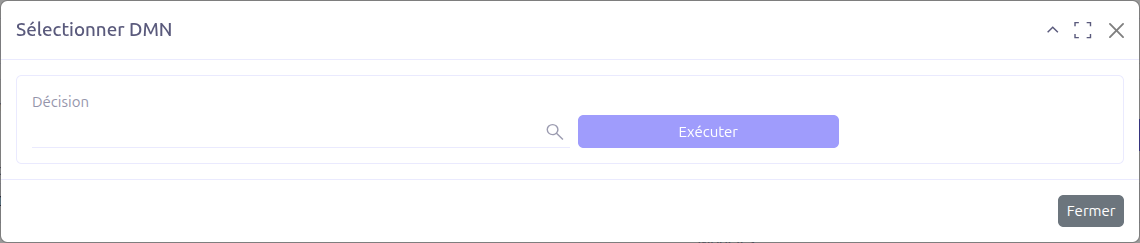
| Field | Description |
|---|---|
Decision table |
Select the decision to execute. The list is filtered based on the models associated with the DMN model (MetaModel or MetaJsonModel). |
Execute button |
Runs the selected decision against the current record context. Enabled only when a decision table is selected. |
Execution Flow
When a decision is executed:
-
The system retrieves the current record and creates a
FullContextvariable -
The variable name is computed based on the model name convention
-
The Camunda engine evaluates the decision table using
evaluateDecisionTableByKey(decisionId, variables) -
The first result row is extracted from the evaluation result
-
For each
DmnFieldthat has a field mapping, the output value is applied to the record:-
Simple fields: The value is set directly on the record
-
Relational fields (dot-notation): The system resolves the relational chain (e.g.,
partner.name) and sets the value on the target sub-record
-
-
The record is saved
| Only the first matching rule result is used during standalone execution. This is consistent with the FIRST hit policy. |
| The execution wizard is particularly useful during development to test and validate your decision tables before integrating them into a BPM process. |
BPM Integration
DMN decisions can be invoked from a BPMN process by using a Business Rule Task.
Connecting a DMN Decision to a BPM Process
-
In the BPM modeler, add a Business Rule Task to your process
-
In the task’s technical configuration, set the Implementation to DMN
-
In the Decision Ref field, enter the Decision Id of the DMN decision
-
Configure the Decision Result Variable to store the output
-
Set the Map Decision Result option to define how the result is mapped to process variables
| Only the Decision Id (not the DRD ID) is used as the decision reference in Business Rule Tasks. |
Output-to-Field Script Generation
When using a DMN decision within a BPM process, Axelor Studio can automatically generate a Groovy script that maps DMN output fields to model fields. This is done via the createOutputToFieldScript action.
The generated script supports:
-
Search operators:
Equal(exact match) orLike(partial match) for finding related records -
Multiple results handling:
Keep empty(leave the field empty if multiple matches) orSelect first(use the first matching record)
For detailed configuration of the Business Rule Task DMN properties, see Business Rule Task.