Indication of errors on diagram nodes.
Feature Description
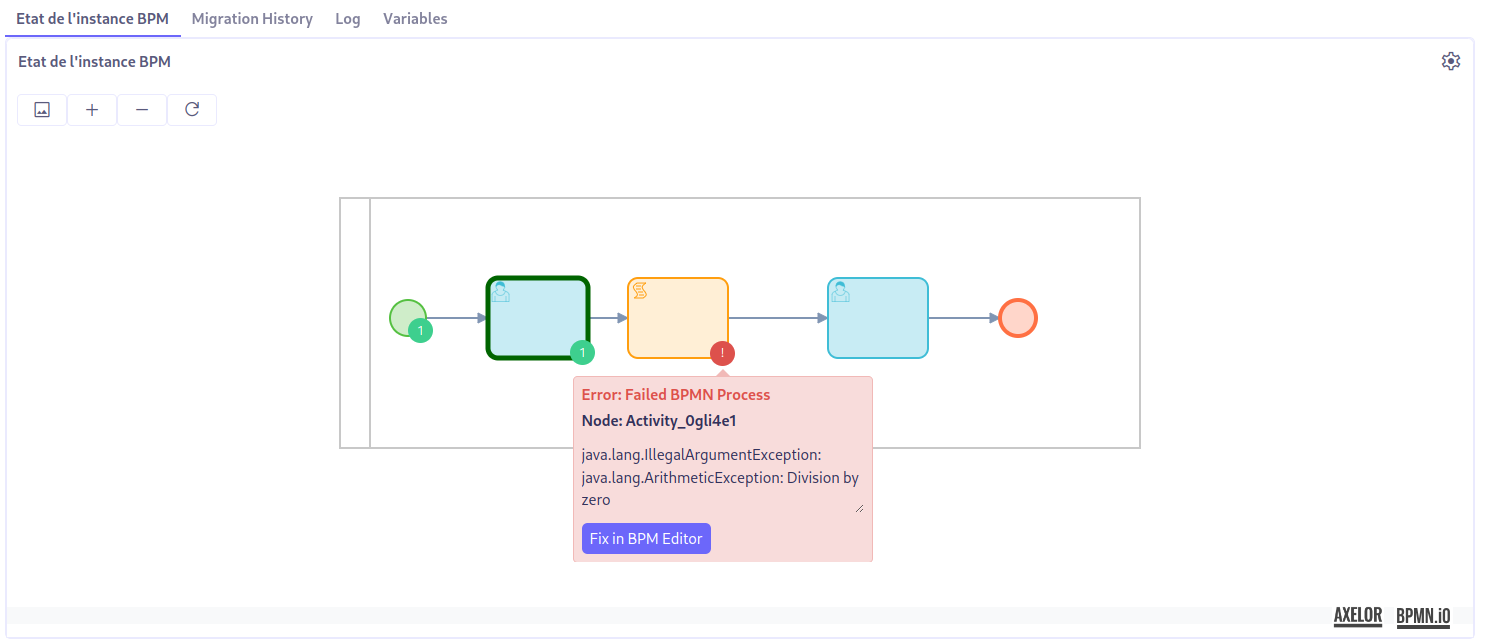
This feature allows users to easily spot errors on the instance diagram during process execution. Errors are visually indicated by red tokens placed on the concerned node. Errors can be detailed by clicking on the token.
Usage
Visualizing errors on the instance diagram:
During the execution of a process, if an error occurs, red tokens are automatically placed on the corresponding nodes on the instance diagram. This allows for easy identification of the parts of the process that require special attention.
Viewing error details:
To get more details about a specific error, clicking on the token next to the node containing the error will display a popup window with detailed information about the encountered error.
Fixing errors in the BPM editor:
After identifying an error, a "Fix in BPM editor" button is available in the popup window. By clicking this button, the user is redirected to the corresponding BPM editor, highlighting the node containing the error, and can then make the necessary changes to resolve the error.