General Introduction to Builders
In the Axelor application, several means are available for constructing scripts, each with specific fields of application. Here is a general presentation of the different types of builders available and their uses.
Architecture
The Shared Builders are implemented as three React applications located under the react/ directory:
| Application | Directory | Purpose |
|---|---|---|
Mapper Builder |
|
Visual field-to-field mapping that generates Groovy scripts |
Generic Builder |
|
Expression Builder and Query Builder for constructing conditions and queries |
Timer Builder |
|
CRON expression and ISO8601 duration builder |
All three applications use:
-
React 18 with Vite build tooling
-
@axelor/uicomponent library -
Axelor REST API (
ws/rest/…,ws/meta/fields/…) for data fetching
The Mapper Builder depends on the Generic Builder as a linked npm dependency ("generic-builder": "link:../generic-builder"), since the Mapper uses the Expression Builder component internally for condition fields.
|
Embedding Pattern
Builders are embedded in Axelor forms using two patterns:
HTML View Embedding
For standalone usage, builders are opened as HTML views within Axelor forms:
<view type="html"
  name="mapper/?id={{_id}}&model=com.axelor.studio.db.ValueMapper&resultField=script"/>
URL parameters control the builder’s behavior:
- id — Record ID to load
- model — Entity class name
- resultField — Field name where the generated output is stored
- Additional builder-specific parameters (see individual builder pages)
React Component Import
For integration within other React applications (BPM modeler, BAML editor), builders are imported directly as React components:
import Mapper from 'mapper';
<Mapper isBPMN={true} onSave={handleSave} />
This pattern is used by the BPM modeler for task configuration and the BAML editor for model mappings.
Generation Pipeline
All builders follow a common generation pipeline:
-
Visual editing — The user configures the builder through the graphical interface
-
JSON metadata — The builder saves a JSON representation of the configuration (stored in a
*Metafield, e.g.,scriptMeta) -
Backend generation — A server-side service parses the JSON and generates the target output (Groovy script, JPQL query, etc.)
-
Result storage — The generated output is stored in the result field (e.g.,
script)
This approach ensures that the visual representation and the generated code stay in sync, and the JSON metadata allows re-opening and editing existing configurations.
Cross-Feature Usage Map
| Builder | Used By |
|---|---|
BPM task configuration (script tasks, user tasks), Studio Actions (Create/Update), BAML models, Value Mapper |
|
BPM gateway conditions, BPM conditional events, Chart filters, Mapper Builder (condition column) |
|
BPM task queries (fetch data from database), BAML queries |
|
BPM timer events (duration, cycle), standalone CRON expression builder (menu: Job management > CRON builder) |
|
Standalone reusable mapping templates, executable against any record |
Graphical builders
Quick presentation of Builders
-
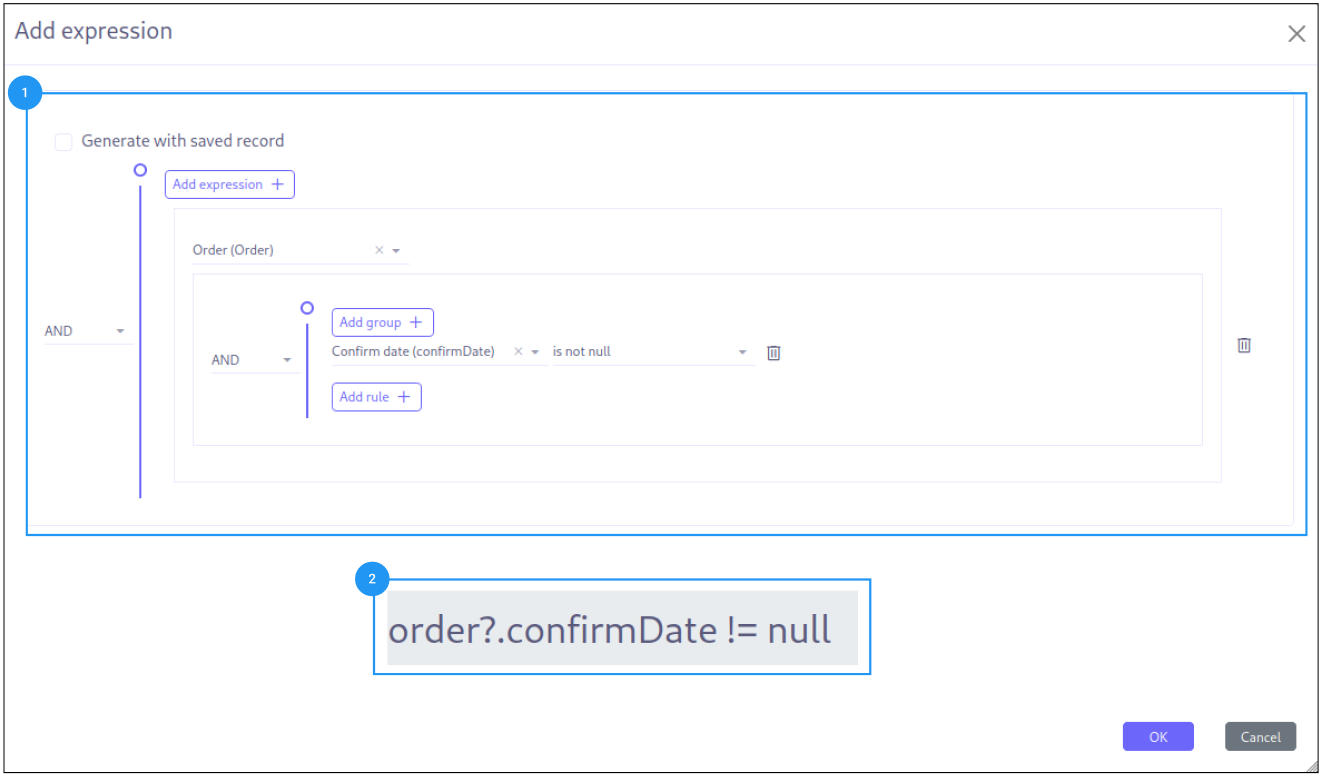
Condition Verification (Expression Builder): This builder generates a Groovy script whose sole purpose is to return a boolean value (true or false). It is mainly used to check specific conditions in business processes.
-
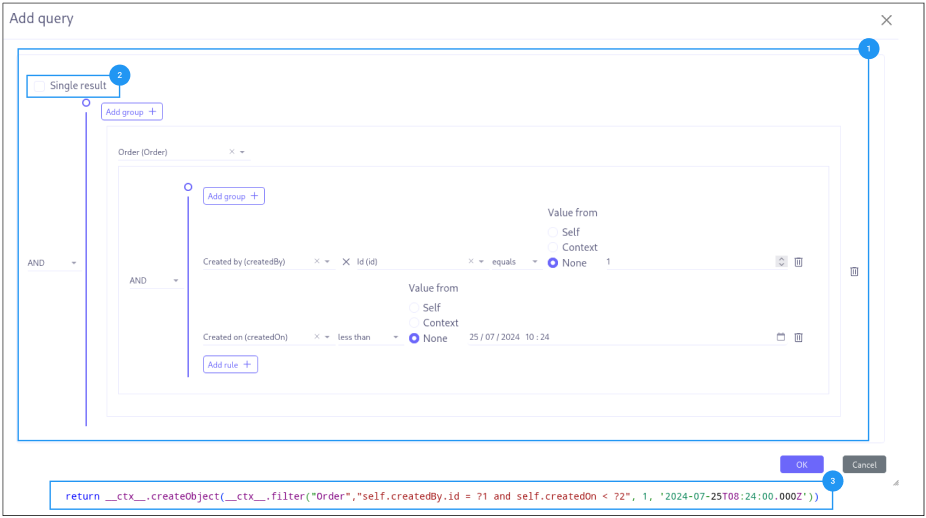
Query Generation (Query Builder): Used to create queries (Groovy based expression) that return either a single result or a list of results based on defined conditions. This allows for filtering and extracting precise data from the database.
-
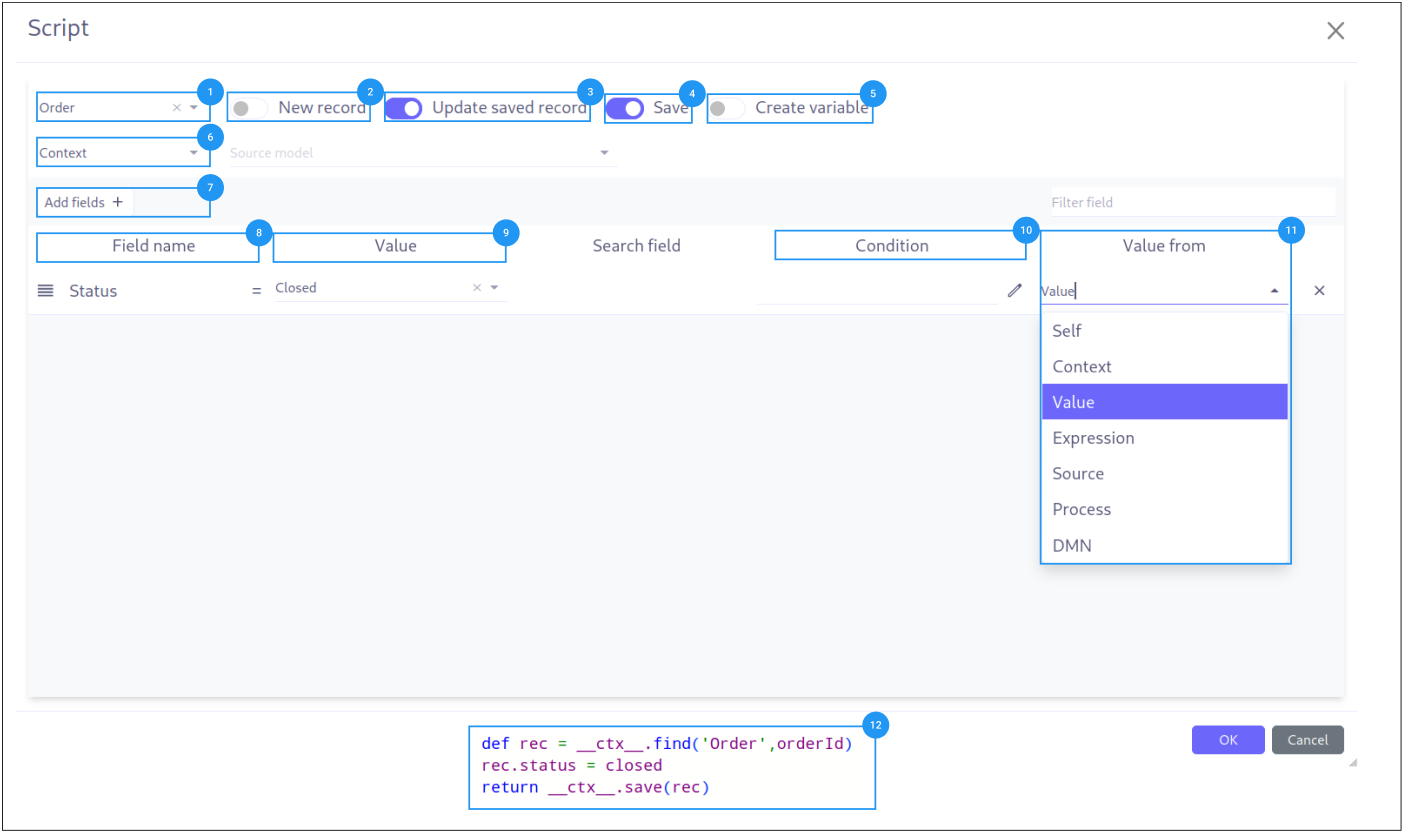
Updating or Creating Records (Mapper): This builder allows for generating Groovy scripts of varying complexity to update or create records in the database. It can also execute scripts that have a direct impact on the data.
-
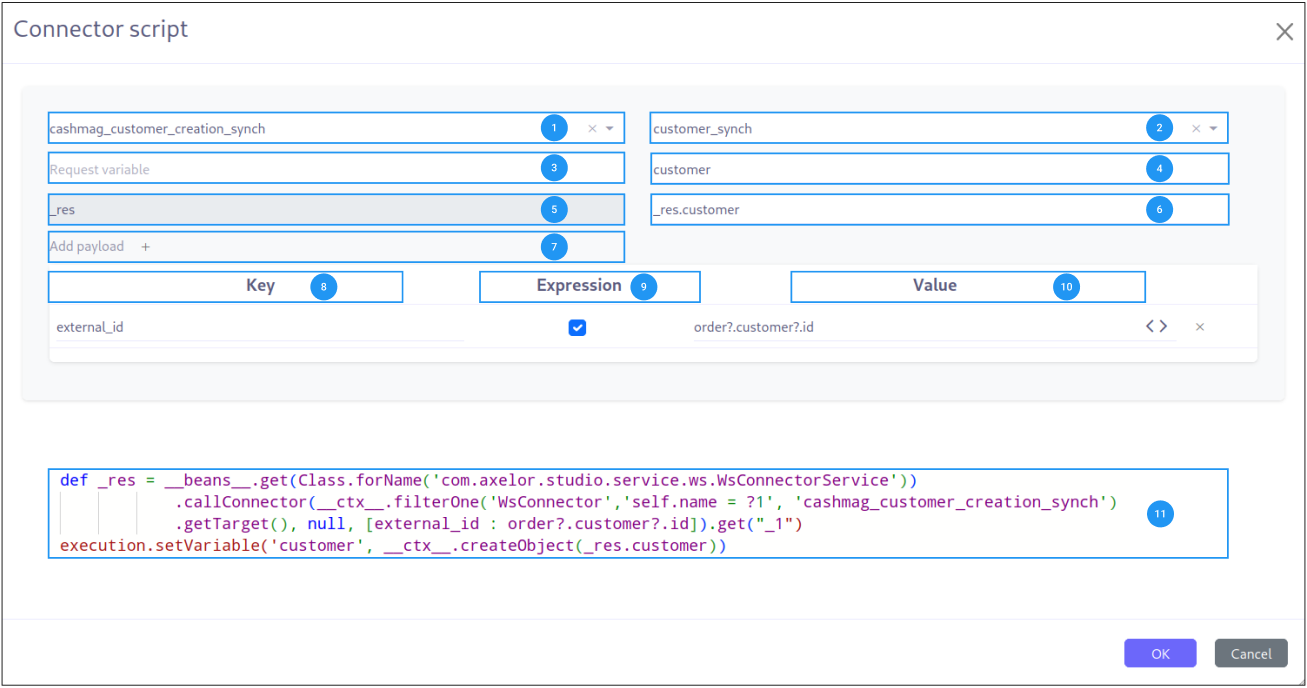
Web Service Call (Web Service Script): This script, more particular, also generates an expression in Groovy. The generation of this type of script is mainly done through graphical interfaces and selections, thus facilitating calls to external web services.
Summary
-
-
Condition: Specification of the condition to be checked. (1)
-
Boolean Return: Definition of the expected result (true/false). (2)
-
-
-
Condition: Data filtering criteria. (1)
-
Unique Result: Option to return a single record. (2)
-
Results: Groovy based generated expression. (3)
-
-
-
Record Selection: Choice of the model to interact with. (1)
-
Record Creation: Configuration to create new records. (2)
-
Record Update: Configuration to update existing records within the process execution. (3)
-
Save Record: Option to save the script result. (4)
-
Create Variables: The script result generate a variable. (5)
-
Source Data: Choice of the model or the process to retrieve data from. (6)
-
Data Assignment: Button to add target model fields in the mapper. (7)
-
Field list: List of fields to assign values to. (8)
-
Field value: Value to assign to the field. (9)
-
Condition: Condition to check before assigning the value. (10)
-
Value source: Source of the value to assign. (11)
-
Generated expression: Groovy script generated from the configuration. (12)
-
-
-
Service Selection: Choice of the connector to call. (1)
-
Request Selection: Choice of a specific request to store the result. (2)
-
Request variables: Definition of the parameters to send with the requests. (3)
-
Request variable name: Name of the variable to store the result. (4)
-
Request global variable: Variable storing the whole result (5)
-
Variable precision: Affect a specific payload to the variable (4) from the global (5) variable. (6)
-
Button to add payload: Add a new payload to the request. (7)
-
Request Parameters: Definition of the parameters to send with the requests. (8)
-
Script activation: Indicate that the value for this parameter is a groovy script. (9)
-
Parameter definition: Groovy script to generate the value of the parameter or a static value. (10)
-
Generated expression: Groovy script generated from the configuration. (11)
-
Available Variables for Scripts
The Axelor script is an extended format of the groovy language, it supports the following inbuilt variables and functions.
-
__ctx__: It represents the context helper service, and it has the following helper functions. It is used in a similar manner with both custom or real models.
-
__ctx__.create(String modelName): It is used to create a new record for the model name passed as a parameter. For example, to create a new product it should be used like
__ctx__.create(‘Product’). It returns the context of the new product created, here the context is the extended version of a normal JPA entity. This context allows the update and retrieval of custom field values too. -
__ctx__.filterOne(String modelName, String query, String[] params): This helper function is used to find the record by using a query. For example, to find a product with code ‘COMP-005’, this can be used like
__ctx__.filterOne(��Product’,’self.code = ?1’, ‘COMP-005’)It will return a single result from the executed query. -
__ctx__.filter(String modelName, String query, String[] params): It is a similar function as the previous one, but it will return a list of records from the executed query.
-
__ctx__.find(String modelName, Long recordId): It will find the fullContext of a given record based on the modelName passed with the given recordId.
-
__ctx__.save(Object object): It allows you to save the fullContext created by
__ctx__.createor record available within the process instance context. -
__ctx__.createVariable(WkfContext wkfContext, DelegateExecution execution): This function is used when a process variable is required to create from the newly created record from
__ctx__.createfunction, here pass that record as wkfContext and execution (inbuilt variable). For example, to create a new variable for a product that is created on the first function, the variable creation can be done by__ctx__.createVariable(product,execution).
-
Example: Here we use the __ctx__.find function to find the record with the given orderId, orderId is a variable containing an order Id and update its status to closed, we use as well the __ctx__.filterOne to search a contact based on a query and after that we use __ctx__.save to save the record and create a variable with __ctx__.createVariable .
def rec = __ctx__.find('Order',orderId)
rec.status = closed
rec.customer = __ctx__.filterOne('Contact','self.fullName = ?1','Mr Norbert Dupont')?.getTarget()
__ctx__.createVariable(__ctx__.save(rec), execution)-
Manipulating object in BPM scripts
-
__ctx__.createObject(value): This function is used to create a mapping in act_ru_variable, where the key corresponds to the model class and the value contains the JSON-serialized representation of the full context. This method is applicable for both individual full context objects and collections of full context.
-
__ctx__.getObject("variablename", execution): This operation deserializes the variable’s value (which is a map of serialized values) and returns the deserialized full context. It’s essential to adhere to the following practices:
-
Always fetch the variable value using ctx.getObject("variablename", execution) to ensure proper deserialization and usability.
-
Any modifications to the variable’s value should be accompanied by updating the variable using ctx.createObject(value), using the same variable name.
-
-
-
__beans__: It represents com.axelor.inject.Beans, which is used to inject and use services.
def venteId = "${venteUnit.id}"
def checkInvoice = __ctx__.filterOne('Invoice','self.importId = ?1',venteId)?.getTarget()
if (!checkInvoice) {
def invoice = __ctx__.create('Invoice')

def i = 0
venteUnit.details.each{ detail ->
    i = i + 1
    def invoiceLine = __ctx__.create('InvoiceLine')
    invoiceLine.importId = "${detail.id}"
    invoiceLine.typeSelect = 0
    invoiceLine.currency = currency
    invoiceLine.invoice = invoice.getTarget()
    invoiceLine.name = detail.name
    invoiceLine.inTaxTotal = detail.total_ttc
    invoiceLine.exTaxTotal = detail.total_ht
    invoiceLine.inTaxPrice = detail.unit_ttc
    invoiceLine.qty = detail.quantity
    invoiceLine.price = detail.unit_ht
    def taxList = [__ctx__.filterOne('TaxLine','self.name = ?1','N_C : 20.00')?.getTarget()]
    invoiceLine.getTarget().addTaxLineSetItem(taxList)
    invoiceLine.unit = __ctx__.filterOne('Unit','self.name = ?1','Unité')?.getTarget()
    invoiceLine.sequence = i
    invoiceLine = __ctx__.save(invoiceLine)
    invoice?.getTarget()?.addInvoiceLineListItem(invoiceLine.getTarget())

    __beans__.get(com.axelor.apps.account.service.invoice.InvoiceLineService.class).compute(invoice.getTarget(), invoiceLine.getTarget())
    __beans__.get(com.axelor.apps.account.service.invoice.InvoiceLineService.class).getTaxLineSet(invoice.getTarget(), invoiceLine.getTarget(),false)

    invoiceLine = __ctx__.save(invoiceLine)

}
In this example, we use the __Beans__ function to call the services of the InvoiceLineService class and perform calculations on the invoice lines.