Message Event
Introduction to BPMN Message Events
In the Business Process Model and Notation (BPMN) standard, a message represents a form of communication between two participants in a process. This communication is modeled as a message event within BPMN diagrams, which can either be a catching or throwing (sending) event. Messages are fundamental in depicting the flow of information across different parts of a process or between different processes.
Differences Between Catching and Sending Messages
-
Catching Message Event: Represents a point in the process where it waits to receive a message. Symbolized by a single thin outline.
-
Sending Message Event: Indicates where a message is sent from the process to an external participant. Depicted with a double outline.
Modeling Messages in BPMN
BPMN models messages with specific icons to differentiate between catching and sending events, ensuring clear communication and coordination between different parts of a process or across multiple processes.
Restrictions Provided by the BPMN Standard
-
Correlation: Ensures messages are delivered to and received by the correct process instances.
-
Instantiation: A start message event can initiate a new process instance with a defined message.
-
Unidirectional: Messages are unidirectional, meaning they can only be sent from one process instance and received by another.
Configurations for Message Events
Symbolized by the following pictograms:

We can distinguish between the following message events:
-
Catch Message Start Event: A start event can only receive a message
-
-
Intermediate Message Event: An intermediate event can send or receive a message
-
-
End Message Event: An end event can only send a message
-




Creating a message
To create a message, you must first define the message in the general tab of the properties panel:
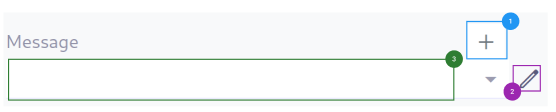
(1) - Automatically generate a message by clicking on the + icon.
(2) - Allow you to search model from other BPM models.
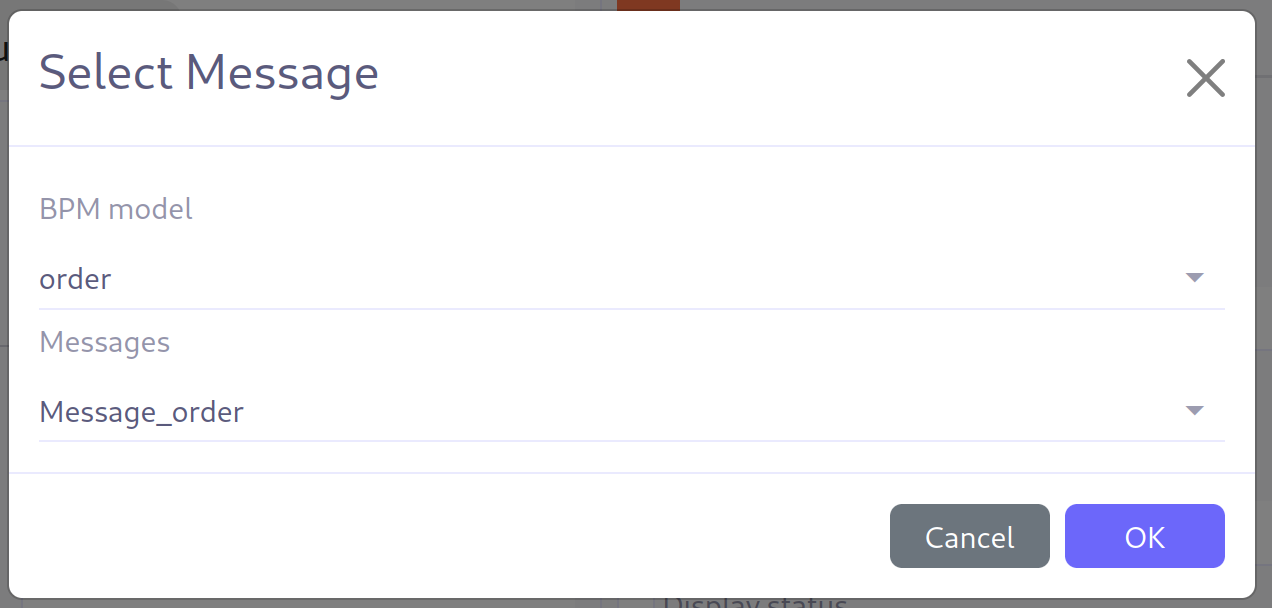
(3) - Display the newly created message or search for existing messages in the BPM model.