Query Builder
Introduction
The Query builder is a tool that allows generating queries (Groovy-based expressions) which return either a single result or a list of results based on defined conditions. This allows filtering and extracting specific data from the database.
Usage
General presentation
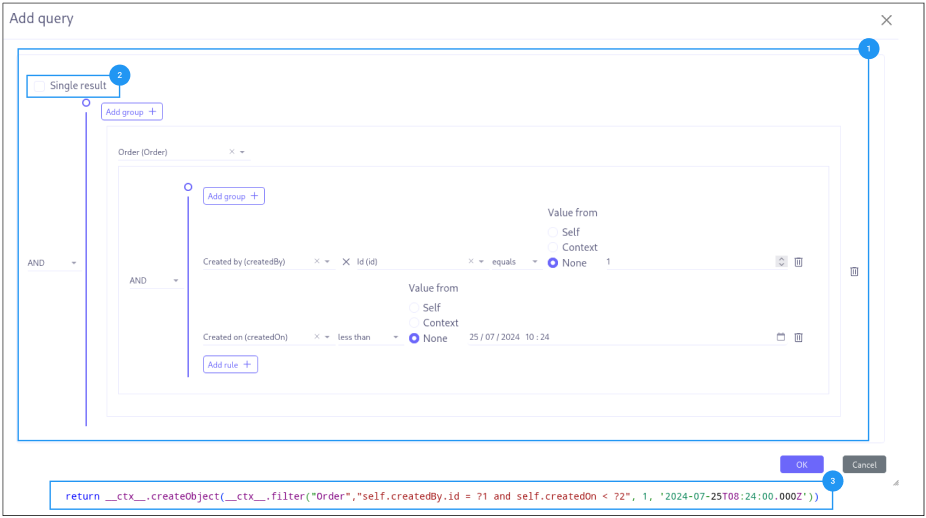
Here are the main features of the query builder:
-
Condition: Data filtering criteria. (1)
-
Unique Result: Option to return a single record. (2)
-
Results: Groovy based generated expression. (3)
Details
-
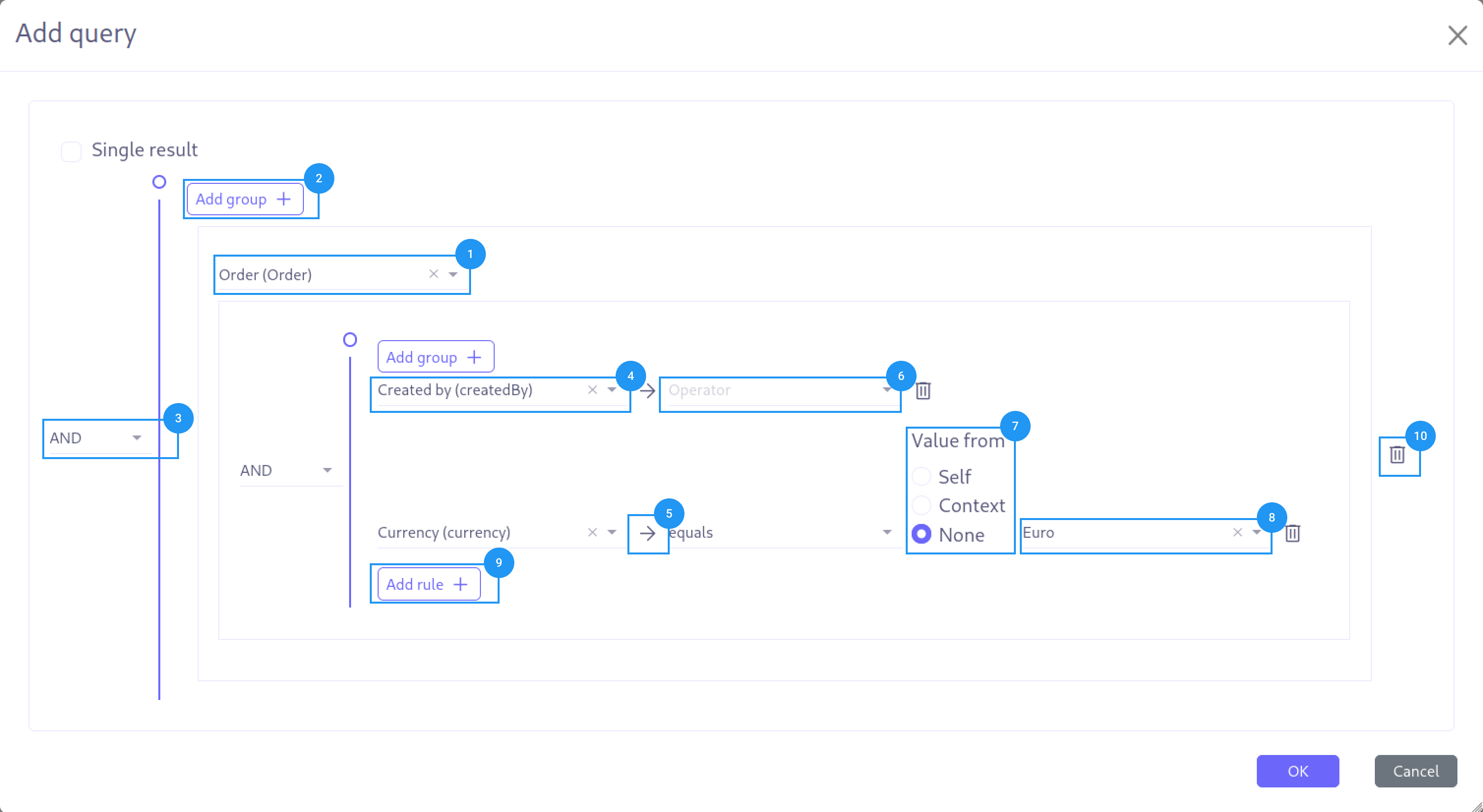
Application table containing the data to be returned. (1)
-
Adding a new group of conditions. (2)
-
Choice of logical operators, OR or AND. (3)
-
Selection of the left member on which a condition is applied. (4)
-
If the left member is a relational field of type m2o or o2o, it is possible to access its fields. (5)
-
Selection of the comparison operator. (6)
-
Selection of the origin of the right member. (7)
-
Selection of the right member. (8)
-
Adding a new condition. (9)
-
Deleting the element (block, rule group). (10)
Value from explanations
The following cases are distinguished:
self: This is a comparison with one of the fields of the designated object (1).
context: This is a comparison with a value from the context, either variables or another model of the application.
none: This is a comparison with a fixed value.
Differences from Expression Builder
While the Query Builder shares the same interface as the Expression Builder, it differs in several ways:
| Aspect | Expression Builder | Query Builder |
|---|---|---|
Output format |
Groovy expression |
JPQL-style query |
Operators |
Groovy operators ( |
JPQL operators ( |
Navigation |
Safe navigation ( |
Standard navigation ( |
Model binding |
Any model via selector |
Fixed via |
Parameterized values |
Not supported |
Supports |
Single result |
Not applicable |
Optional |
Multiple groups |
Single expression |
Multiple expression groups joined by top-level combinator |
Generated Output
The Query Builder generates code that uses the Axelor context helper to execute queries:
__ctx__.createObject(__ctx__.filter("com.example.Model",
    "self.status = ?1 AND self.amount > ?2", 'active', 1000))
This wraps the JPQL query in:
-
ctx.filter(model, query, params…)— Executes the query and returns matching records -
ctx.createObject(…)— Wraps the result in a context-aware object
Parameterized Queries
The Query Builder supports parameterized queries for safe value binding. Parameter placeholders are automatically generated based on the rules:
-
Positional:
?1,?2,?3 -
Named:
:param1,:param2,:param3
Values are passed as separate arguments to the filter method, preventing SQL injection and ensuring proper type handling.
BAML Query Variant
When used within BAML (isBamlQuery=true), the Query Builder generates a simplified output without the ctx.createObject(…) wrapper:
"self.status = ?1 AND self.amount > ?2", 'active', 1000This format is consumed directly by the BAML query engine.
Package-Level Queries
When the queryModel parameter contains (e.g., com.axelor.apps.base.db.), the Query Builder enters package mode. In this mode:
-
The field selector shows only fields common to all entities in the specified package
-
Fields are fetched via the
QueryBuilderController.getCommonFields()endpoint -
This allows building queries that apply to any entity in a package
Package-level query support depends on the axelor-tool module being present in your application.
|
URL Parameters
The Query Builder is activated by setting type=query in the generic-builder URL:
| Parameter | Description |
|---|---|
|
Must be set to |
|
The model to query. The model selector becomes read-only when this is set. |
|
When set, enables parameterized query support |
|
Record ID to load existing query |
|
Entity class storing the query configuration |
|
Field storing the generated query |
|
Field storing the JSON metadata |