Expression Builder
Introduction
The Expression Builder is a visual tool for creating Groovy expressions that evaluate to a boolean result (true or false). It is used throughout the BPM modeler and Studio to define conditions for sequence flows, conditional events, view attributes, and action triggers.
The Expression Builder generates Groovy scripts from a visual rule-based interface, eliminating the need to write condition scripts manually.
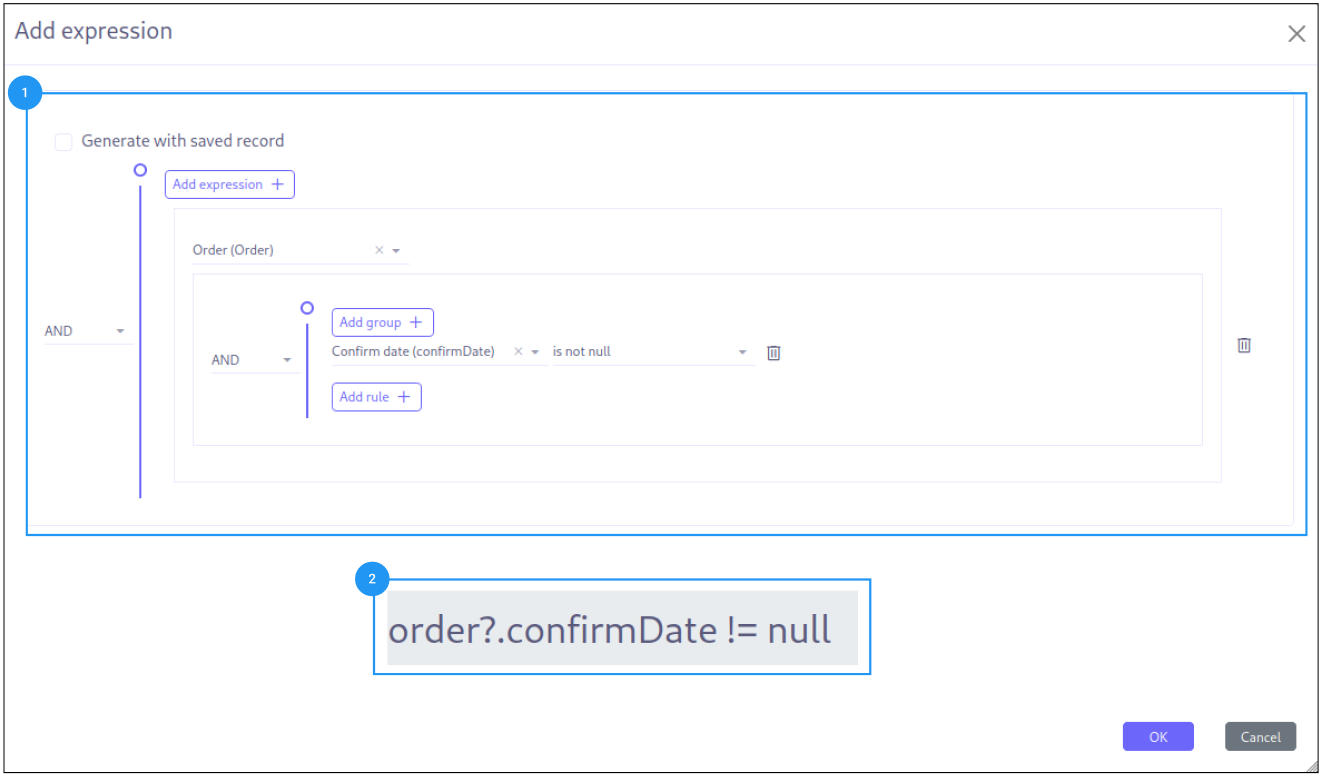
Details
Meta Model Selection
At the top of the Expression Builder, select the data model that provides the context for the expression. This determines which fields are available for building conditions.
-
Standard models: Select from the application’s MetaModel list
-
Custom models: Toggle to select from MetaJsonModel (custom/JSON models)
Rule Groups
Conditions are organized into rule groups. Each group contains one or more rules combined with a logical operator:
-
AND: All rules in the group must be true for the group to be true
-
OR: At least one rule in the group must be true for the group to be true
Rule groups can be nested to create complex conditions. Click + to add a new rule, or Add group to create a nested rule group.
Field Selection
Each rule starts with a field selector:
-
Select a field from the current model
-
For relational fields, navigate through the relationship chain using dot notation (e.g.,
customer.address.city) -
The available operators update based on the selected field’s type
Operators
The Expression Builder supports 18 operators, each applicable to specific field types:
| Operator | Description | Applicable Types |
|---|---|---|
|
Equals |
All types |
|
Not equal |
All types |
|
Greater than |
Numeric, Date |
|
Greater or equal |
Numeric, Date |
|
Less than |
Numeric, Date |
|
Less or equal |
Numeric, Date |
|
Value is in a set |
Relational (M2M) |
|
Value is not in a set |
Relational (M2M) |
|
Value is between two bounds |
Numeric, Date |
|
Value is not between two bounds |
Numeric, Date |
|
Field is null |
All types |
|
Field is not null |
All types |
|
Contains (pattern match) |
String, O2M |
|
Does not contain |
String, O2M |
|
Boolean is true |
Boolean |
|
Boolean is false |
Boolean |
|
Collection contains |
M2M |
|
Collection does not contain |
M2M |
Value From
The right side of each rule defines the comparison value. Three modes are available:
| Mode | Description |
|---|---|
Self |
Compare against another field from the same model. Useful for rules like . |
Context |
Compare against a variable from the process/script context. Useful for rules like "status = processVariable". |
None (static) |
Compare against a typed static value. Enter a text, number, date, or select from a list. |
Generated Expression
The builder generates a Groovy expression at the bottom of the panel. This expression is what gets stored and executed at runtime.
Example generated expression:
customer != null && customer.country?.code == "FR" && totalAmount > 1000|
You can view the generated expression but cannot edit it directly from the Expression Builder. To manually edit expressions, use the script editor (pencil icon) instead of the builder. |
| If you manually edit an expression that was generated by the builder, the builder settings will be lost. The builder cannot re-parse manually modified expressions. |
Generation Modes
The Expression Builder produces different output depending on the context:
Groovy Mode
Used for standard expression evaluation (gateway conditions, conditional events). Generates Groovy expressions with safe navigation:
record?.status == 'active' && (record?.amount > 1000 || record?.priority == 'high')Key characteristics:
-
Uses
?.safe navigation operator to avoid NullPointerException -
String values are quoted
-
Boolean operators:
&&(AND),||(OR)
BPM Query Mode
Used for BPM database queries. Generates JPQL-style expressions:
self.status = 'active' AND (self.amount > 1000 OR self.priority = 'high')Key characteristics:
-
Uses
.navigation (no safe navigation) -
JPQL operators:
=,IN,NOT IN,LIKE,MEMBER OF -
Boolean operators:
AND,OR
See Query Builder for more details on the BPM Query mode.
Additional Options
Standalone vs Embedded Mode
The Expression Builder can be used in two ways:
-
Embedded: Opened as a dialog from the BPM modeler properties panel (conditional events, sequence flows, listeners)
-
Standalone: Opened as an HTML view with URL parameters for external integration
URL parameters for standalone mode:
| Parameter | Description |
|---|---|
|
Builder type ( |
|
Record ID for loading saved expressions |
|
The target model for field selection |
|
Field name to store the result expression |
|
Field name to store builder metadata (for reconstruction) |
|
Whether the builder is in condition mode |
|
Field name filtering the model selector |
|
Enable parameterized query support |
|
Model name for query mode |
React Component Mode
The Expression Builder can also be imported as a React component with the following props:
-
onSave— Callback for saving the expression -
exprVal— Initial expression value -
defaultModel— Pre-selected model -
isBPMN— Enable BPM mode features -
isMapper— Used within the Mapper Builder -
isBamlQuery— BAML query variant
Related Pages
-
Builders Introduction — Overview and scripting context
-
Query Builder — Building data queries
-
Mapper Builder — Field-to-field data mapping